Concert update: Howie Mandel; Snoop Dogg; Bonnie Raitt
The following concerts recently were announced.
Howie Mandel:
The comedian and “Deal or No Deal” host performs at 8 p.m. Jan. 15 at the Reno Sparks Convention Center. Tickets are $55, $65 and $75, available at Ticketmaster outlets and fee-free at the Atlantis gift shop. Details: 800-745-3000.
Snoop Dogg:
The gangsta rapper and Priority Records boss plays at 8:30 p.m. Jan. 19 at MontBleu. Tickets are $37.50 and $40, available at MontBleu and other Ticketmaster outlets. Details: 888-829-7630.
Buckcherry:
The rock band behind “Sorry” hits the road for the Jaegermeister Music Tour with Hellyeah, All That Remains and The Damned Things at 7 p.m. Jan. 23 at the Reno Events Center. Tickets are $33.50, available at Ticketmaster outlets, the Silver Legacy box office and the REC box office on event days and today’s on-sale date. Details: 800-745-3000.
Tower of Power:
The funk-soul band plays at 7:30 p.m. Feb. 5 at Harrah’s Lake Tahoe. Cost: $40. Details: 800-786-8208 or www.southshoreroom.com.
Badfish:
The Sublime tribute band plays with openers Scotty Don’t at 8 p.m. Feb. 9 at the Knitting Factory, 211 N. Virginia St. Tickets are $15 general, $30 reserved. Details: 775-323-5648.
Voice of the Wetlands Allstars:
The roots rock band featuring Tab Benoit, Cyril Neville, Anders Osborne, Big Chief Monk Boudreaux, Johnny Sansone & Waylon Thibodeaux bring their stories and messages of the Louisiana wetlands at 9 p.m. Feb. 12 at the Crystal Bay Casino in Crystal Bay. Tickets are $22 in advance, $25 day of show. Details: 775-833-6333.
Bernadette Peters:
The singer-actress performs at 8 p.m. Feb. 14 in the Grand Sierra Resort Theater. Tickets are $40, $55 and $70, available at the Grand Sierra and Ticketmaster outlets. Details: 775-789-2285.
Bonnie Raitt:
The blues-rocker plays at 8 p.m. Feb. 18 in the Grand Sierra Resort Theater. Tickets are $60.50, $82.50 and $104.50, available at the Grand Sierra and Ticketmaster outlets. Details: 775-789-2285.
Eric Clapton:
The iconic blues-rock guitarist plays with opener Los Lobos at 7:30 p.m. March 3 at ARCO Arena in Sacramento. Tickets are $39.50 and $149.50, available at 10 a.m. Monday at Ticketmaster outlets. Details: 800-745-3000.
Book Mark it-> del.icio.us | Reddit | Slashdot | Digg | Facebook | Technorati | Google | StumbleUpon | Window Live | Tailrank | Furl | Netscape | Yahoo | BlinkList
I magine it’s Jan. 1, 2010, and a psychic has laid out the following music predictions for the year: Ke$ha , the self-proclaimed “sick and sexified” singer of “TiK ToK,” will not fade into obscurity. B , a rapper who sings and plays guitar, and Bruno Mars , a Hawaiian who specializes in modern-day doo-wop, will help each other become famous with a tenderhearted duet.A 12-year-old Oklahoma boy will sign with Lady Gaga’s management after performing “Paparazzi” at his school’s talent show. Meanwhile, a 10-year-old “America’s Got Talent” finalist will take her operatic seasonal EP to No. 2 on the Billboard 200, and another 10-year-old will have grown women whipping their hair back and forth.A song about a mythical private jet will hit No. 1 and gift us with the year’s best new party terminology: slizzard.Only one rock band will reach the Hot 100 top 10 Train , with “Hey, Soul Sister.” Photos: Behind-the-Scenes of Billboard’s Year-End Cover Shoot In a year when some of the music industry’s few remaining presumptions, such as “digital sales will keep growing” and “tours can withstand a weak economy,” were subverted, no one can be blamed for not foreseeing all the ways in which pop music would take over the marketplace. Impressively, ‘Tik Tok’ was Ke$ha’s first single to make it on to Billboard’s charts. The recipients of Billboard’s highest group honor are country crooners Lady Antebellum, whose hit ‘Need You Now’ spent a whopping 42 weeks of the eligibility period on the Billboard top 40. As far as top songs, following “Tik Tok” were “Airplanes” by B.o.
Perhaps Ke$ha is gearing up for a run in 2011. I’ve accepted the fact that my fans are now my family, and I won’t be having boyfriends.
I’ll just be having a really amazing relationship with the radio.” Billboard: Were you prepared for that transformation? B featuring Bruno Mars’ “Nothin’ on You” and Mars’ “Just the Way You Are.” When these are the four artists delivering the closest thing to a slow jam, it’s safe to say we’ve entered a new era. “When you listen to radio now, it’s all so much about tempo,” says Barry Weiss, outgoing chairman/CEO of RCA/Jive Label Group, which can count Ke$ha, Usher and P!nk among this year’s biggest success stories. “We’re in a golden spot for pop music, for sure,” adds Antonio “L.A.” Reid, chairman/CEO of Island Def Jam Music Group , whose artists Bieber, Rihanna and even Kanye West helped solidify pop’s current boom. “I don’t see it moving any time soon.” Next: The Grammys Give Pop the Love
Book Mark it-> del.icio.us | Reddit | Slashdot | Digg | Facebook | Technorati | Google | StumbleUpon | Window Live | Tailrank | Furl | Netscape | Yahoo | BlinkList
Windows Phone 7 Zune Desktop Sync
- Tweet
- Share
Users of Windows Phone 7 have an excellent interface with which to synchronise music, video and images with their PC. The Zune desktop client makes this possible as well as providing a gateway into the marketplace, and makes it possible to purchase and download music, video and apps – particularly useful if you don’t have wireless internet and your network provider doesn’t offer affordable mobile internet.
The Zune desktop client offers several additional configuration tools for your phone, making it an absolutely vital addition for any Windows Phone 7 owner.
Download and Install Zune Desktop Sync
To get started syncing media between your phone and PC, visit www.microsoft.com/windowsphone to download the Zune software. This will require you to sign in with a free Hotmail/Windows Live account, while your PC or laptop must have a 1GHz or faster CPU (32-bit or 64-bit), 1GB of RAM for 32-bit or 2GB for 64-bit systems and a broadband internet connection – the installer package is 105MB.
Once download is complete, installation is simple and straightforward and with the Zune software running on your Windows 7 PC you will be ready to sync your phone!
Connecting and Syncing Windows Phone 7 with Zune Desktop
There are two ways to sync content between your Windows Phone and your PC – via USB cable or if you have a Wi-Fi router you can sync wirelessly.
However the initial sync must be by USB so with the Zune software running connect your phone to your PC or laptop via the USB cable. The Zune software – a music player, shop and sync manager all in one – will launch, and display the Summary screen for your phone. To setup a wireless sync, go to Settings > Wireless Sync and click Enable Wireless Sync, following the subsequent on-screen instructions until the sync is established. This will save you from having to connect your phone via USB whenever you want to sync data with your PC.
One thing you might notice about Zune is that there is no facility to synchronize a calendar as there is with Windows Mobile and ActiveSync. This is because calendars can now be easily synced wirelessly or via the web, and therefore no longer require additional software to manage these relationships.
A Windows Phone 7 device that has been used to take photos and record video clips will send the clips to your PC or laptop when connected to the Zune desktop client, and these options can be managed in the Settings > Phone > Pictures & Video screen.
Installing Apps via Zune Desktop Sync
Windows Phone 7 apps can be installed via the Zune desktop using its access to the Marketplace, a vast repository of all music, video and software for Windows Phone 7; a bit like iTunes.
To access downloadable apps on your computer, go to Marketplace > Apps, where you will find some recommended options and a list of app types on the left hand menu. Here you will also be able to purchase games for your Windows Phone 7. To download or purchase an app, select the app that you want, check the reviews and click on the Purchase or Trial button (or Free for free apps). Zune will then ask you to confirm your purchase.
If you don’t have a payment option setup, you will need to arrange this via Settings > Account in Zune, where you can add a VISA, AmEx, Mastercard or Discovery credit card to fund your purchases.
Book Mark it-> del.icio.us | Reddit | Slashdot | Digg | Facebook | Technorati | Google | StumbleUpon | Window Live | Tailrank | Furl | Netscape | Yahoo | BlinkList
AT&T Samsung Focus Review
When the brand new Windows Phone 7 OS came to play in the US, only 3 phones showed up for the launch party. Arguably, as the mobile history books are written, these could be remembered as the most important phones that ever use the platform; if they are a letdown or failure of any kind, it could mean an early death for Microsoft’s latest and riskiest investment.
Samsung was one of the first manufacturers to take a swing at the platform, bringing out the Super AMOLED-equipped Focus to make a stellar example of WP7, showing off many of the platform’s capabilities. With a 4” capacitive touchscreen and 1 GHz processor, it’s definitely on the high end of the spectrum, and offering phones like the Focus tells the world that Microsoft is ready to play with the big boys and isn’t messing around anymore.
So while it’s going to be known as one of the very first Windows Phone 7 devices in the US, will it also be known as a good phone? Let’s find out what the Samsung Focus is all about.
Hardware and Design of the Samsung Focus
In hand, the Samsung Focus has a very familiar feel to it because it’s designed quite similar to many of Samsung’s other most recent phones, such as the Galaxy S. With its 4” touchscreen, thin body and rounded curves, anyone who has used a Galaxy S device will feel right at home with the Focus. It has a certain aura of elegance about it, and is a device I truly enjoy looking at. Even though it has a large screen it doesn’t feel like I’m holding a barge; the same cannot be said about other devices with 4-4.3” screens. At 4.07 oz the Focus is very light for its overall size.
I was a bit disappointed that Samsung chose to go with a black glossy all-plastic exterior that would attract fingerprints from a fly, let alone my grubby hands. While it may all be plastic, at least the back cover is something besides a boring flat back. Instead, Samsung designed it with some clever angles, keeping the middle raised and tapering it off on the edges. It adds class and makes the whole phone look solid.
As mentioned earlier, the Focus has a Super AMOLED display that makes the screen resolution brighter than the competition, helps save battery life, and uses thinner parts so the phone itself can be much thinner at 10 mm. The resolution of the screen is 480×800. In contrast to the LG Quantum, the colors and more vibrant and deep, and it’s easy enough to tell the difference when holding the two phones up next to each other. I did notice at the same time, however, that the screen brightness itself was higher on the LG Quantum when both were on the same brightness level.
Still on the front of the phone, 3 capacitive touch-sensitive buttons are shown directly underneath the screen. These 3 — back, Windows, and search — are the same as any other WP7 device since Microsoft requires this layout on every one of its phones. There are small changes the manufacturers can make: for example, the LG Quantum chooses to keep back and search touch-sensitive but turn the Windows button into a physical button. Samsung opted to go all touch, straight across. Fortunately all three of these buttons are easy to press, and at a comfortable place for my thumb when I’m holding the phone with one hand. I don’t feel as though the phone will just go off-balance and fall out of my hand easily, and that’s a great comfort to me.
The Focus attempts to keep the outside of the phone as minimal as possible. It subscribes to the idea that the less physical buttons there are, the better. On the left side you’ll notice the volume up/down rocker, again in the perfect spot for my thumb when one-handed.
On the right side, you’ll see both the camera button (I believe this is also a requirement on every WP7 phone; Microsoft prides itself in the ability to take pictures no matter if the screen is locked or if you’re in a different screen) and the power/screen lock button.
Up on top is the 3.5 mm headphone jack and the Galaxy S-esque MicroUSB charger port with the sliding door to help keep moisture and dust out without worrying about a dinky plastic flap just coming off the phone. I’ve always enjoyed this small but significant innovation.
Rounding up the tour of the Focus, the back simply has the 5 MP camera with LED flash and a decent-sized spot for the back speaker, as well as logos and the aforementioned angles. The battery cover is a basic snap-on and pry-off cover, nothing new. Underneath the battery cover there is room for a SIM card and MicroSD card slot.
A word about the MicroSD, since it relates to the overall hardware of the phone. This particular issue has been a rather large controversy and source of utter confusion ever since before the phone was even released. Here’s the scoop on it.
Originally Microsoft hadn’t intended any of its phones to have accessible expansion card slots, but somehow the Focus slipped through the cracks and shipped with one anyways. We’re still hazy on the details on how this occurred and why it was allowed to pass through testing this way, but the fact is that while the slot can technically recognize a MicroSD card (I’ve seen plenty of successful attempts), an official memo sent out by AT&T explains that no MicroSD cards currently made are actually compatible with WP7. The memo mentioned that owners of the Focus should wait until Microsoft-certified cards are available, though there is no word on exactly how long this will take. In the meantime, if a card is used, there is a rather sizeable risk to it in that it can severely affect the performance of your Focus. So for now, take full advantage of the 8 GB internal memory that the Focus has, and be patient until the new Focus-specific cards come out.
All in all, the Focus feels elegant, classy and modern. I don’t feel as though the phone’s style will be obsolete within the next few months, which is always a huge plus to potential buyers. Nobody wants to buy a phone that just looks old and outdated.
Software and OS of the Samsung Focus
The Focus being a Windows Phone 7 device (am I the only one who keeps wanting to say “Windows Phone 7 Phone”?) could either be a blessing or a curse, depending on how you look at the OS. The phone has to somehow get past Microsoft’s soiled reputation in the world of mobile and prove not only itself but the OS that operates on it as well. That’s a rather heavy burden for any WP7 device to have at present time. Contrast that pressure with that of its relative, the Samsung Captivate, which has much less pressure on it than a normal phone just because it happens to run Android, an OS that’s already been proven a hundred times over.
At least the Samsung Focus does a spectacular job of handling this pressure well. As I was playing with the phone, never once did I think I was actually playing with first-generation firmware. The interaction with the OS platform was incredibly smooth and I rarely found any type of glitch or bug. This is a huge difference from that of the T-Mobile G1 running first-gen Android firmware, for sure.
Though there are a few things that I missed having on WP7 (copy and paste, *cough cough*), I know that I could use this phone on a long-term basis and be perfectly happy with it.
More details on my WP7 experience in a future review. But suffice to say, Focus had a heavy burden to bear, and bore it flawlessly.
One more note on the OS experience. Microsoft went polar opposite of Android’s multi-UI approach and actually clamped down on what phone manufacturers could do with the WP7 firmware. Each and every Windows Phone has the same exact layouts, user interfaces, and minimal spec requirements, to ensure that a phone maker can’t go messing up what Microsoft has already “perfected” and try to add in its very own flavor. Microsoft just held its ground and said if you want to play with me, you have to go by my rules. Fair enough, Microsoft, I think it’s probably for the better.
There are a few small changes each company can make. One such leniency Microsoft has granted is in the Marketplace, where each company can feature its very own store within the Marketplace itself. So Samsung has put in a few extra apps that can only be downloaded on the Focus and none other, such as:
Samsung Photo Sharing: Gives you the ability to upload multiple pictures at once to certain SNS sites.
Now: Basically identical to Daily Briefing on Samsung Android devices; shows your essential life information, such as weather, stocks, news, etc.
Three: Exclusive to H3G, gives easy access to customer support.
Network Profile: For any unlocked Samsung WP7 devices. Allows you to switch your active network profile to whatever networks are available, and gives you a list of networks to choose from. Great for international traveling.
Exciting? Not really. I wasn’t too impressed by the lack of choices in the “Samsung Zone”, as it’s called. When using the LG Quantum I noticed a much better selection of apps in LG’s Hub than I did with Samsung. Fortunately, this isn’t really that large a concern since the majority of apps that you’ll be interested in downloading will be available in the main Marketplace on any WP7 phone.
Camera and Camcorder
The camera built into the Focus is a good quality 5 MP that does offer LED flash and autofocus. It was a little tricky trying to find the best way to get the pictures completely focused, but after just a couple practice shots I had it down easy. From that point on it was smooth sailing and I felt the pictures turned out very well.
These pictures below are taken in my backyard under cloudy and almost rainy conditions, so there is a lower light level than usual. But the pictures still turned out great.
The camcorder is 720p HD resolution at the max, though you do have the option to record at a lower screen resolution. The advantage of doing this is in how much space you’ll save between the two different styles. If you’re running low on memory and can’t get to a computer to transfer existing files over, go with the lower res for a small period of time.
Thing is, when you look at this video below, it’s hard to tell that it’s in HD in the first place. Panning around my backyard made the video look slightly choppy, as if it takes a while for the picture to catch up with where the camera’s pointing. So at least outside it seemed sluggish. Using it inside looked slightly smoother but it is not 100% by any means.
You can set the camera to automatically or manually upload your pictures to SkyDrive, making it even faster and easier to get your pictures moved to your computer. It’s always nice to have the wireless upload ability to limit the number of times you actually need to plug your phone into your computer.
Multimedia and Browser
Sideloading the Focus on my PC was a piece of cake. All I needed to do in order to get started was download the Zune app on my computer, and plug the phone in. The Zune app booted right up and took me step by step through the setup process so it could recognize the Focus. Once setup, it was incredibly easy to go in and pick out which artists I wanted to listen to and import any pictures I had taken on the Focus already (and that’s if you never took advantage of the Focus’s ability to take the pics in your gallery and upload them to Microsoft Live SkyDrive).
Once on the phone, the music was easy to find since it was in the “Music+Video” tile. Going into that program, I was immediately faced with the options of music, videos, podcasts, and marketplace.
While I enjoyed the audio quality of the music I loaded into the phone, I was hoping to find an equalizer somewhere in the phone to adjust my bass and treble settings based on what genre I was listening. I couldn’t find any equalizer available.
Fortunately, WP7 allows me to perform other tasks while listening to my music player, so I could easily browse the web, text or email at the same time. Microsoft hasn’t enabled multitasking for third-party apps yet, but at least there is a small degree of multitasking that I do have access to.
Speaking of browsers, the included Internet Explorer on the Focus is rather robust. If you’re not a huge fan of IE, don’t worry too much about this version because it doesn’t look anything like the computer versions; instead, it’s optimized for your Windows Phone. Switching between active windows is easy, you can do voice searches, and the pinch-to-zoom and accelerometer work like charms here. Sadly, I absolutely hated the fact that going into my Google Reader pulled up the same mobile site that you would see on an old Blackberry or messaging phone. It’s hard going back to this style after getting used to the Android and iPhone web apps.
Even if you never use Google Reader, the important thing to take out of this is the idea that while most sites look perfectly fine (and normal) through the WP7 IE browser, those sites that are Android/iPhone optimized won’t be optimized on this OS platform (at least, not yet).
Extra Tidbits
With a 4” screen, typing on the WP7 keyboard was never an issue at all. In fact, going to this phone from an iPhone made me feel at home, because the keyboard was very responsive and Microsoft built an excellent autocorrect feature in with the keyboard itself that exceeds any other platform’s version.
Performance of the Samsung Focus
While having a solid OS and user experience matters a great deal, none of it is relevant if the phone itself is a piece of junk. Thus, it’s time to evaluate the performance of the Samsung Focus doing the most important stuff — its job.
Fortunately I was very pleased with everything on the Focus. For instance, the battery life on it is outstanding, especially compared to any iPhone or Android device I have ever used. I am fairly positive it had the best battery life I’ve ever used in a smartphone, which is saying a lot. The battery life is rated at 6.5 hours of constant talk time, but during my review I used the Focus as my primary device, which includes texting, emailing, web browsing and social networking, and the battery lasted me the entire day with some left to spare. I still charged it up every night, but I personally never had to worry if it would last through the day without getting a spare charger somewhere. Any phone that can start the day at 9:00 with full charge and still have 15% left at midnight is a winner in my sight.
The call quality was also excellent. No dropped calls, no static, and nobody complained on the other end of the line when I made my calls. The volume was high enough for me to hear everything clearly, and the speakerphone was equally impressive. In fact, I never had to bump up the volume to the highest setting, because moderate volume was good enough for me.
Finally, the 1GHz processor is coupled with 512 MB RAM, which makes this phone extra speedy. Scrolling up and down, the screen kept up with me without falling behind. It moved instanteously whenever I moved my fingers. The programs loaded up without major delays and everything I did using the phone was rather seamless. While other similar phones use the same speed processor, they don’t feel as speedy because they don’t have as much RAM as the Focus.
In my reviews I hate to say nothing but good things about a phone, because it’s my job to find little nitpicky things to like and not like, and there are goods and bads with every phone no matter how close to perfect it may seem. With that said, I was hard-pressed to find things I didn’t like about the phone that weren’t related to the OS in some way. The Focus has top-notch specs and carries those specs very well. I am rather disappointed in the SD card slot debacle, and hope it can get fixed soon so the Focus can have more than 8 small GB of storage space inside.
But overall, provided you are willing to venture into unknown territory with an unproven first-generation OS, the Samsung Focus is a great option to consider for your purchase. It is currently available in AT&T stores for $199 with contract and no mail in rebate.
Below you will find my video review of the Focus and a full gallery of pics.
For more reviews on Windows Phone 7 devices, check out my LG Quantum review.
If you liked the post, you might find these interesting too:
- Unboxing the LG Quantum: Brad’s First Impressions
- LG Quantum Windows Phone 7 device now available from AT&T
- Unboxing the LG Quantum Windows Phone for AT&T
- Windows Phone 7: AT&T’s HTC Surround, Samsung Focus and LG Quantum detailed
- IFA 2007 Report: Samsung SGH-i550 with GPS navigation and Google apps
-
actually the camera button is exactly where it should be all smartphones have to be rotated into landscape or the video will be sideways when transfered to your computer
-
this is a good phone, not because of Microsoft, but Samsung.
blog comments powered by Disqus
« HTC plans to ship 60 million smartphones next yearSamsung Google Nexus S up for pre-order at Carphone Warehouse, £549.99 SIM-free »
Book Mark it-> del.icio.us | Reddit | Slashdot | Digg | Facebook | Technorati | Google | StumbleUpon | Window Live | Tailrank | Furl | Netscape | Yahoo | BlinkListThis picture made me smile so I know you would enjoy it as well.

Looking for the
source
just in-case
concert pictures are not the fastest to find.
I am eager to see your thoughts regarding this photo, or or just about concert?
iKit releases AutoCon FM and handsfree touchscreen kit
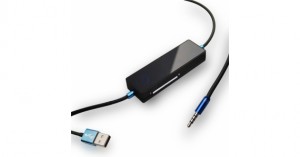
iKit, an iDevice accessory maker, is offering a new sort of MP3 player-compatible FM transmitter — the AutoCon, a fully touchscreen-controlled unit that also integrates a hands-free iPhone control and a USB-based car charger in one package.
The AutoCon uses rapid auto-scan to find and lock onto “empty” FM frequencies to help play the music with little or no interference, and a wide touch bar so that users can easily play/pause, adjust volume, skip tracks and so on. The display also displays frequency or song information. If connected to an iPhone, users can wirelessly answer incoming calls as well.
The AutoCon FM Transmitter is available now and costs $45.
Book Mark it-> del.icio.us | Reddit | Slashdot | Digg | Facebook | Technorati | Google | StumbleUpon | Window Live | Tailrank | Furl | Netscape | Yahoo | BlinkListWhen I woke up today I checked my favorite site for free sheet music, and I discovered something wonderful. A new song was added to Piano-Sheets.net – Pray. Pray by Justin Bieber is a terrific song, and I’m thrilled I could write a post about it.
My friend Brian was visiting me a few days ago. I’m always happy when he visits. He plays piano in a band. I asked him if he could give me some pointers on how to play Pray. Pray by Justin Bieber is hard to play. He started to improvise, then asked me to print a free copy of the sheet music. I looked on google for a bit, and managed to find it at Piano-Sheets.
download this free sheet music for Pray by Justin Bieber
“You get exactly what you are FEELING.”
Today I was looking for concert shots… I stumbled into this very incredible shot: Athena.
I should post more concert pics like this one.

Athena can be summed up by these words:Athena’s last gig. An awesome band, it was really great to work with them.
Looking for the source just in-case people are always asking me.
Was this photograph of concert is worth seeing?
Book Mark it-> del.icio.us | Reddit | Slashdot | Digg | Facebook | Technorati | Google | StumbleUpon | Window Live | Tailrank | Furl | Netscape | Yahoo | BlinkList
FestiGoGo: The Apple Itunes App is Released
After two years in the making, MacFriends, Inc. today released FestiGoGo on the Apple iTunes App Store. FestiGoGo is a free iPhone app that provides comprehensive music festival information, and allows users to discover, learn about, and keep up with a wide variety of music festivals around the United States. FestiGoGo is described as being festival-centric, in that it is all about music festivals, “A pocket full of music festivals.”
“There are some music festival apps in the iTunes App Store,” said Richard Sarver, president and co-founder of MacFriends, Inc., “but what sets FestiGoGo apart from all the rest is its comprehensive nature. FestiGoGo allows even the smallest folk festival to be represented and gain exposure on mobile devices, right next to some of the largest music festivals in the industry.”
FestiGoGo is now available on the iTunes App Store.
More information can be found online at http://www.festigogo.com
Related posts:
- iPhone app rates Angelina Jolie as ‘hottest celeb’
- Google upgraded Gmail app for android
- Now Watch Indian TV channels on iPhone
- Apple Launches MacBook Air Features
- Google Planning to launch music service

Digital Music And Music Tech Roundup: Follow-Ups, The Cost Of Spotify …
SF Music Tech: Followups
I have slowly been going through my live updated notes from yesterday’s seventh SF Music Tech Summit. Follow-ups are posted as they roll in. Please join the conversation. One thing I do enjoy about updating live is that multiple people are able to expand on ideas presented at the event both during and after the event itself. The best conferences continue past the last hour and generate as many or more ideas as they do business.
SoundCloud Introduces Record Button
SoundCloud introduced a new feature on their iPhone app; the Record button. Artists can easily interact with fans and other artists with the click of an obvious button in their app. SoundCloud widgets capture the recordings in real time. As bands and artists post sound or music recordings, fans can comment on the social stream or right on the widget itself. SoundCloud provides bands with new creative tools. They make compelling suggestions for using the Record button, too; including interviewing your own fans in short spurts, asking fans to fill in claps, or just inviting fans to be part of your new track. I’ll totally clap for you, so let me know if you try it.
Ontario Bans Ticket Reselling
It’s called the Ticket Speculation Amendment Act, and it makes selling or distributing tickets to a related re-seller illegal in Ontario. If convicted, a company can be fined up to $50,000 whereas individuals may only have to pay a fine of up to $5,000. Read more about Ontario’s Ticket Speculation Amendment Act and Ticketmaster’s reaction.
Spotify Launch Still A Mystery, Price Is Not – Sorta
Spotify CEO Daniel Ek spoke at the D: Dive Into Mobile tech conference earlier today, once again referring to licensing deals as the only setback for Spotify’s launch in the United States.
“It just takes time” he said, even though cloud competitors like non-interactive Pandora and On Demand competitors like Rdio and Mog have inked deals with the same labels missing from Spotify’s US catalog. While the hold up is due to major label objections to freemium models, Spotify offers an on-demand ad free service the cost of which he said will be $10 per month (the same as other on-demand streaming services). Even though all the objections seem to be over freemium, On Demand streaming pays artists a fraction of a penny per stream, which isn’t very much either. Over time, if listeners play music over and over, the $10 a month you pay for on demand streaming could yield a new revenue stream for artists & labels, in addition to royalty checks from Performance Royalty Organizations. So, do you stream music you like (or don’t like) over and over at on-demand services such as Mog or Rdio? I do.
Fake Bob Lefsetz didn’t make me laugh this week. If you know of any humorous music industry twitter accounts, let me know: corey@sfappeal
Want more news, sent to your inbox every day? Then how about subscribing to our email newsletter? Here’s why we think you should. Come on, give it a try.
Book Mark it-> del.icio.us | Reddit | Slashdot | Digg | Facebook | Technorati | Google | StumbleUpon | Window Live | Tailrank | Furl | Netscape | Yahoo | BlinkListWhen one listens to music, no matter what kind it is, if it is pleasing to you it will have an affect on you that is similar to that of a mild narcotic. We are chemical beings and thus are affected by external stimuli via our senses and music comes to us this way.
There are too many types of music to discuss here in the article, however, all music is similar in that it affects the one who is open to it in a positive manner. It is not my task here to discriminate between the different types of music that there are and to see which ones are better than others. The task of this article is to demonstrate that any music that the listener is stimulated by is responding to it much in the same matter as a drug.
The first thing that one has to ask is “What kind of effect does music have on you that parallels to a drug?” and then the second thing you have to do is qualify the statement by asking “What kind of drug?” For the purposes of the article I will state that what I mean by drug is a simple non-life threatening non mind altering drug such as marijuana, alcohol, and other mild drugs.
The affect: When you listen to a piece of music that you are “in tune” with, that you like, it will have an immediate hold on you and you are transformed from where you are now to an ethereal place in your mind. What is happening to you when you are in this state of mind is you and being taken away from focus for that is point of music as with a drug. You do not lose you mind when you are under the influence of alcohol or marijuana, what you are is relaxed and more importantly non-focused and that is the key.
When you are listing to music that you like your mind may wonder off to times past or to other sentiments leaving you vulnerable to not getting your tasks done much like a drug. It is a very common thing for a certain piece of music to remind you of a time in your life and that past time is brought to the present upon hearing the piece, but it is a fooler because that time is long past and you are responsible for your situation now. Dazing off to the tune of music will only cause you trouble because it will keep you from getting your work done.
The thing to watch out for is having music around you when it is appropriate. For example, while I am here writing this article I am not able to have any kind of music on, no matter how soft and mild it is, any music for me while I am writing is a distraction and gets in my way when I am trying to write. This is because I am extremely high focused and do not want distractions. Writing more than any other activity requires extreme focus because you are dealing with the story line which is the seed of life. Similarly, when I am drawing I am able to listen to Classical music because it compliments my mood but when I attempt to listen Lady GaGa (whose music I like very much) while I draw it has negative results because it is too distracting.
So when you want to get things done you may find that it best to turn off the music.
Stephen F. Condren – Artist
Hearing loss in US teens shoots up
December 6, 2010 (LOS ANGELES) — Blasting out a few rockin’ tunes on that mp3 player may be blowing out your kids’ hearing.
More than 90 percent of young people listen to personal music players, which is a testament to the relentless drive of technology over the past 10 years.
Sadly, many people listen to those MP3 players with the sound cranked up to full volume for multiple hours each day.
Research shows that 66 percent of personal music player users are listening to music at louder than 85 decibels, which according to the World Health Organization can cause permanent hearing damage.
Several small studies have found that reported use of personal music players is associated with declining hearing function in adolescents and young adults. The Journal of the American Medical Association (JAMA) published a study that found hearing loss amongst U.S. teen’s age 12 to 19 had shot up from 14.9 percent to 19.5 percent since about 1990.
LONGER LISTENING, MORE DAMAGE: Hearing loss isn’t only related to the volume of your music, but also the duration at which you listen. Every time you increase a sound level by three decibels, listening for half as long will produce the same amount of hearing loss.
Earphones inserted into the ear canal produce sound waves, which can exceed 120 decibels — a similar level to a jet leaving the runway (and just about as loud as a live rock concert).
Since damage to hearing caused by high volume is determined by its duration, continuous listening to a personal music player, even at a seemingly reasonable level, can damage the delicate hair cells in the inner ear that transmit sound impulses to the brain.
SAFE LISTENING: The Children’s Hearing Institute (CHI) recommends that children not get exposed to loud noise over 80 decibels, while the average iPod is played at 100 to 115 decibels. Hearing experts recommend the 60/60 rule — listening to personal music players for no more than 60 minutes at a time at 60 percent of maximum volume.
FUTURE: Hearing loss, which becomes more common with age, is creeping farther down the age spectrum.
An article in the journal Pediatrics estimated that 12.5 percent of children age 6 to 19, around 5.2 million — have noise — induced hearing loss.
In a worldwide survey conducted by the American Speech — Language — Hearing Association (AHSA), more than half of high school students showed at least one symptom of hearing loss.
For More Information, Contact:
Josef Shargorodsky MD, MPH
Massachusetts Eye and Ear Infirmary
(516) 974 — 3803
[email protected]
Get more Healthbeat »
healthbeat
- Comment Now
- Report a typo
AT&T LG Quantum Review
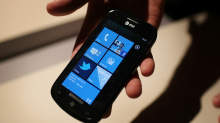
Windows Phone 7 is brand-spanking new to the mobile OS world, trying to win back hearts of millions of disenchanted WM 5 and 6 users who grew frustrated at the lack of change. With iPhone and Android taking charge in popularity and user friendliness, Microsoft’s reputation in the world of handheld devices grew more and more sour to the point of scrapping the entire WM project and starting from the ground up. Thus, Microsoft has released a completely unknown and unproven OS around the globe, hoping phone manufacturers and consumers will welcome Windows Phone 7 with open arms. It’s a huge risk for anyone to invest so much money in this new platform.
So far only a few players have stepped up to the plate to take that risk. LG is one of those players, introducing the Quantum and Optimus 7 handsets as its primetime investments. Today I will be reviewing the Quantum, now available in the US on AT&T.
While Microsoft has set a very specific criteria for OEMs to follow in making WP7 handsets, the LG Quantum still has been able to stand out of the crowd by offering the only horizontal slideout QWERTY keyboard in the US as of this writing (The Dell Venue Pro is the only other handset in the US with a physical keyboard, but uses a vertical slideout keyboard instead).
To note, I love the choice of the phone’s name. Hearing Quantum always makes me think of quantum mechanics/physics and Quantum Leap. No matter which way you think of the word, it signifies a rather large jump forward in one way or another. This is incredibly symbolic of the goal Microsoft is attempting to achieve with WP7.
Thanks to our friends at LG we have been given the opportunity to review the Quantum for a couple weeks, and it’s time to share our thoughts with you. How does the LG Quantum act and feel, and how does it hold up against its WP7 brethren? Find out in this full review of the LG Quantum.
Hardware and Design of the LG Quantum
In the worldwide launch of WP7, it’s almost as though all the phone companies got together and drew straws to decide which form factor each company would design; there are so many different types of Windows Phones out there that you really have your choice of whatever style fits your needs. LG chose to include a full-sized physical QWERTY keyboard in designing the Quantum and threw it in as horizontal slider.
Doing so does mean that the phone itself weighs 6.2 ounces and spans out at dimensions of 4.7 x 2.34 x 0.60, making it heavier and thicker than its competitors. Fortunately it does not sacrifice style points or even comfort points in the process. When I held the phone in my hands I did not feel like it was too heavy for it to be comfortable. On the contrary, I actually felt that the LG Quantum is the most solidly built of all three AT&T WP7 devices. The Quantum is built primarily with rubber and metal materials. Instead of being the primary ingredient, plastic is only thrown into the mix as a secondary material. Not only does the rubber and metal give it a more solid feel, it also makes the Quantum more aesthetically pleasing. For instance, the back cover is all brushed metal and adds a very classy look to the device. The rubber sides make the phone already feel like it has a case on it, even though it doesn’t.
The Quantum uses a 3.5? capacitive TFT touchscreen with a resolution of 480 x 800 pixels. This is small compared to the larger touchscreens of its WP7 brethren, but it does help the Quantum feel more compact than it really is. The touchscreen does not feel too small; on the contrary, it’s just right for the phone’s design. Any larger would cause the Quantum to be a behemoth as a whole that wouldn’t even fit in your pocket comfortably. Fortunately, LG used the right blend of decent screen size with keyboard size and made it work rather well.
Microsoft requires the same 3 buttons be used on the front of every WP7 device: back, home, and search. Both back and search are built into the screen display and are only touch-sensitive, whereas the home button is a lonesome physical button down all by itself, down below the screen. This is a special design technique that LG used, and having a physical home button works very well.
Touring around the sides of the phone, on the right side you will find a volume up/down rocker and camera button. The bottom has absolutely nothing. On the left side there is a micro-USB charging port that is covered by a plastic flap that can be peeled off to reveal the port; most phones use the flap as a standard to keep dust and moisture out, though I worry that it may be easily torn off if not careful. On the top you can see a standard 3.5 mm headset jack and a power/screen lock button.
The back of the phone has a brushed metal battery cover that displays the LG and Windows Phone logos on it, and you can also see the 5 MP camera and LED flash accompanying it. Seeing this kind of battery cover along with the neighboring rubber shows me that LG was very concerned about making their phone to last long enough to get your money’s worth out of it, and to make it a more enjoyable experience using the phone overall.
In my reviews, one huge deal maker or breaker is the keyboard. If it’s not comfortable enough to use, it’s almost impossible to recommend since the chances of that phone’s keyboard becoming miraculously comfortable over time are slim to none. Thankfully I had a great experience using the keyboard on the LG Quantum. The sliding mechanism is incredibly solid and built strong. There is no looseness whatsoever but yet the slider is easy enough to slide open without considerable effort or strain.
The Quantum keys are comfortable to type on with my average-sized fingers and thumbs. Each key has been separated out and ever-so-slightly raised as to make the keys easier to press. Looking more closely at the keyboard itself, there are four rows; the bottom row is dedicated primarily to the space bar, direction pad and emoticon button, while the remaining 3 rows are for the letters. The number row is partnered up with the usual top row of letters, meaning the Q is also 1 and so forth. There is no .com button. Curiously the “fn” button, the button responsible for shifting your typing over to the blue symbols such as numbers or punctuation marks, has been pushed off to the left side to hang out with the upper arrow button. This took some getting used to, since pressing that button so far to the left doesn’t feel natural to me. It just seems out of place, as if it was just an afterthought.
We don’t see anything new or out of the ordinary on the LG Quantum’s hardware or design; it’s just built to last and knows its primary purpose, and fulfills that purpose well.
Firmware and OS on the Quantum
It shouldn’t come as a surprise that the LG Quantum uses the brand new Windows Phone 7 OS. I will be giving a full review of WP7 shortly. In short, the WP7 interface is what will either get you interested in the Quantum to begin with, or cause you to be uninterested in it and be looking for a different phone. Microsoft took a few lessons from Apple and tightened down the restrictions on what its phones can and cannot do, which means the UI you see on the Quantum is the same as you’d find it on any other WP7 device. There are only a few minor differences between the two, which I will cover in another section, but mostly your experience with WP7 on the Quantum won’t be any different at all than on its competitors.
Overall I have been very pleased in using Windows Phone. As a first-generation OS, Microsoft has out-performed the first-gen version of any other smartphone OS ever made, including that of the iPhone (which when it first came out did not have apps, couldn’t send MMS and lacked several key features any self-respecting smartphone would automatically come with). The screen is incredibly responsive; no matter how I swiped or touched the screen with my fingers there was no delay whatsoever. Pinch-to-zoom worked beautifully on the browser and maps.
I was happy to see that the Quantum comes included with 16 GB internal storage space inside the phone. This memory is not expandable, unfortunately, because Microsoft chose not to give users access to the MicroSD slot on any WP7 device (with the exception of the Samsung Focus; even though the MicroSD slot is accessible on the Focus, however, AT&T has acknowledged that no current microSD card is fully functional until new ones can be produced that are Windows-certified). On the Quantum this particular slot is covered up with a secured silver plate and unless you are paying attention to it, you won’t even know it’s there.
Using a sideways sliding keyboard on the Quantum, I quickly noticed another interesting aspect of the Windows Phone OS: landscape mode is limited and not universally used in every application. I definitely could open the keyboard and be warmly greeted by landscape mode on Internet Explorer and Messaging, but several other native and third-party apps could not function in landscape mode even though the keyboard was slid out. For instance, I attempted to go into Slacker and had to type in my user name and password while turning my head sideways to look at what i was typing in portrait mode. This may become more universal with the introduction of new WP7 updates, but currently is rather frustrating. It’s a Microsoft limitation, not LG, but just having a horizontal QWERTY keyboard makes that limitation painfully obvious as you begin to use the phone on a regular basis.
The Quantum is full of great features that aren’t unique to the WP7 world: 1 GHz CPU, 256 MB RAM, GPS, 5 MP camera with 720p HD recording . But the fact that these aren’t unique to Windows Phone 7 is a compliment to the cutting-edge nature of the new OS. No slowpokes or “budget” devices allowed; each device has to include these kinds of specs, if not even better than these, in order to use WP7. This is admirable simply because it shows Microsoft only wants its phones to be high-performance. This will greatly reduce the possibility of a bad phone hurting the OS’s reputation. Wanting to be cream of the crop, LG’s Quantum definitely fits the bill as a high performing device. I will go into more detail on how LG stands out later in the review.
Multimedia/Internet Capabilities
Microsoft has integrated Zune into all of its phones in attempt to give each device the richest possible multimedia experience. Whether it’s watching videos or listening to music or podcasts, Zune is tightly woven into the Music+Video app on the LG Quantum. If you plan on using any sort of multimedia on the Quantum, it will be essential to download the Zune application on your PC (or for Mac users, a beta version of Windows Phone 7 Connector is available for download as well). Plugging in the Quantum you will be able to move music and video files to it from your computer easily, not to mention pictures or videos from the Quantum to your computer. Once I loaded my music onto the Quantum via my PC, the phone automatically started searching through the Marketplace to find artist info, bios, album covers, and other related information to the music I loaded in.
The Zune pass is also available to use on the Quantum. For $14.99/month you can choose to subscribe to Zune pass, which gives you unlimited streaming of your favorite songs and 10 free downloads that you can keep each month. It’s definitely recommended to get the Zune pass and use it directly on your Quantum. Zune access is tied into the phone’s marketplace so that you can search not only for applications, but games and Zune songs and artists as well. Zune also offers support for podcasts and radio as well. One additional option AT&T throws in (again, for a monthly fee) is AT&T radio, which is essentially another streaming internet app along the same lines as Pandora or Slacker. Frankly, Slacker is already available for free through the Marketplace, so it’s hard to argue the need to shell out extra money each month for a similar service.
One cool feature that you’ll find on Windows phone 7 is the ability to automatically upload any picture or video you take directly to your online Skydrive account, which will already be setup for you since you had to create a Live account to begin using the Quantum in the first place. The Skydrive will offer you plenty of space to store and backup all of these pictures taken on your phone so you — or any of your friends — can check out your latest pics. If you don’t want to share your pics with anyone, you have the ability to keep them private or just not upload to Skydrive at all if preferred.
Video playback is great on the Quantum. Taking advantage of the above-average screen resolution I was impressed by the image quality of the videos loaded onto the Quantum. Most major video formats are supported, so there is no need to worry about what type of format to put your movies into prior to loaded it in your phone.
Internet Explorer was fast and easy to use, both through AT&T’s 3G network and WiFi. IE supports multiple open tabs and landscape mode, and the pinch to zoom functionality works flawlessly on it. There is no delay, no catching up. It’s incredibly responsive and quick. I also didn’t have any problem downloading pages or even apps using the Quantum.
I enjoyed using the camera on the Quantum as well. With a 5 MP camera, it’s on par to compete with the other top players in the market like the iPhone 4 and Samsung Galaxy S. The pictures (and HD videos also) turned out just as crisp and the colors just as vibrant as the aforementioned devices. Definitely right on track to be a top competitor here. Here are a couple pics taken with the Quantum’s camera:
Marketplace Apps on the LG Quantum
Microsoft gives each manufacturer the opportunity to place their own app store into the Windows Phone Marketplace. That way when you use the Quantum to check out the marketplace, LG App Store is one particular option to look at. Inside, LG has developed several exclusive apps that can only be used on the Quantum or Optimus 7. Here are some of the apps LG features in the store:
Play-To: This app is DNLA-based, which means you can connect your Quantum with your PC, Xbox 360, or TV through your local WiFi connection. Through this connection you can stream any movies or music from the Quantum onto any of these other devices, effectively turning your Quantum into its own remote control of sorts.
Look n Type: If you walk and text at the same time, it’s a good idea to be safe and look where you’re going. With Look n Type, it turns your camera app on and overlays your messaging functionality on top of it. This lets you type while seeing the ground in front of you. Clever idea — now only if someone could come out with a Drive n Type app, we’d be set! (disclaimer: texting and driving is very bad. Don’t do it.)
Tool Box: A handy 7-apps-in-one app. It offers a flashlight, level, unit converter, and world clock, amongst others.
Panorama Shot: Just as it sounds, this is a camera app that automatically puts your pictures into a 360-degree panoramic shot. Great for scenic pictures.
Photo Stylist: Much like Photoshop.com, this takes your phone pictures and lets you add extra filters and effects to them, to add style and coolness to them.
A?ll of these apps offered in the LG apps store are free and easy to download.
Performance of the LG Quantum
The shining star on the Quantum is its battery life. We’ve noticed much improved battery time on Windows Phones in general, but after playing with the Quantum for a week I was quite impressed by how long it really does last. I typically start the day with a full charge at around 9 AM and use the phone regularly throughout the day: meaning I make random calls, do texts and emails, use Twitter and Facebook and search around all of my other apps on the phone, and still end the day with around 20% charge. So even though I still charge the phone every night, this is a huge improvement in battery life over most iPhones or Androids that I’ve used in the past.
Making and receiving calls ended up being a great experience, as the audio quality was excellent on both sides of the conversation. I always understood everything on the other end of the line because the calls were crisp and static-free, the speaker on the phone is sufficiently loud, and I never had any concern dropping calls.
As mentioned earlier, the high standard of top-quality specs in any Windows Phone will help it be a good performer, but I was still impressed by how quick and responsive the LG Quantum is. I never had any delays getting into apps, or even moving back and forth through the menus of the phone.
Overall I was pleasantly surprised using the LG Quantum. The only frustration I had with the phone was the on-screen keyboard just simply because it felt too tiny to use; however, this would always prompt me to just slide open the keyboard and take advantage of faster typing that way. Any other frustrations I had were based off the Windows Phone OS (which I will cover in my full WP7 review) and not the phone itself.
If you are looking for a Windows Phone that uses a full physical keyboard, I recommend the LG Quantum as a great option for you. To get more details on the Quantum, check out my full video review below as well as the complete photo gallery that shows off the Quantum.
You can also win 3 LG Quantum and 2 Optimus 7 smartphones by filling out our survey.
If you liked the post, you might find these interesting too:
- Win 3 AT&T LG Quantum and 2 LG Optimus 7 WP7 handsets with us
- Unboxing the LG Quantum Windows Phone for AT&T
- Unboxing the LG Quantum: Brad’s First Impressions
- Microsoft Zune / Pink phone coming in two months, WM7 included?
- “Zune phone” references coming straight from Microsoft
-
Best info yet.
-
Thanks for the informations. Now I am confuse what to buy if this phone or Samsung Galaxy. What do you think?
blog comments powered by Disqus
« Unboxing the Samsung Continuum on VerizonApp Review: Google Reader for Android »
Book Mark it-> del.icio.us | Reddit | Slashdot | Digg | Facebook | Technorati | Google | StumbleUpon | Window Live | Tailrank | Furl | Netscape | Yahoo | BlinkListHere is another funny image I wanted to share with my readers

Click to visit the
site where this photo came from
since
mosh pit pictures are not the simplest to find.
I am eager to see some opinions on this photograph, or any other aspects of mosh pit?
Book Mark it-> del.icio.us | Reddit | Slashdot | Digg | Facebook | Technorati | Google | StumbleUpon | Window Live | Tailrank | Furl | Netscape | Yahoo | BlinkList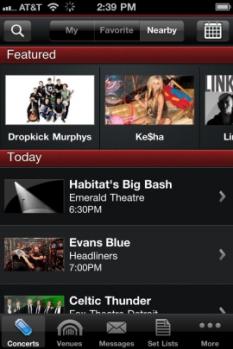
Live Nation for iOS: Buy concert tix on the iPhone
Find concerts in your town and buy tickets on the spot with the new Live Nation app.
(Credit: Screenshot by Rick Broida)
Suppose you just found out Brendan Benson is playing in your town (he’s in L.A. tomorrow, FYI). You don’t have to run scrambling to the nearest computer to buy tickets; just fire up the new Live Nation app. With it you can find concerts in your area and buy tickets on the spot.
If your first reaction is to leave a comment telling me how much you despise Live Nation (and, by proxy, Ticketmaster), go right ahead. In fact, I’ll start: If I want to pay a lot of ridiculous fees on top of already overpriced tickets, I’ll just book some air travel, thank you.
But, hey, it is what it is. If you love live music, you rarely have a choice but to use Live Nation/Ticketmaster–so you might as well get some convenience out of the deal. (Say, maybe this is what all those “convenience” charges are for!)
It’s a good app, letting you browse by concert or venue (both based on your location). You can search for artists or choose to see all the shows for a particular day.
Tap the Favorite button and the app does something clever: displays a list of shows based on artists already in your library. That’s a huge time-saver. Of course, you can manually add artists to your Favorite list as well.
Live Nation’s coolest feature? Set Lists. Choose an artist and the app displays a list of shows–sometimes dating back years. Tap a show and you’ll see the entire set list. And if a song is available from iTunes, you can play a snippet or buy it.
My main complaint is that you can’t look up concerts that aren’t local. For example, if I’m flying to California tonight and want tix for tomorrow’s Brendan Benson show, I’m out of luck–until I touch down, that is.
I wasn’t able to test an actual ticket purchase, but all the elements are there: you can choose a price and/or section (where applicable), view a seating chart, and even request wheelchair-accessible seating.
For that kind of convenience, I don’t mind paying a little extra.
Book Mark it-> del.icio.us | Reddit | Slashdot | Digg | Facebook | Technorati | Google | StumbleUpon | Window Live | Tailrank | Furl | Netscape | Yahoo | BlinkList
Live Nation releases free app
Filed under: iPhone, Music
Live Nation releases free app
by Mike Schramm (RSS feed) on Dec 3rd 2010 at 9:00AM
Ticket seller Live Nation has released its very own iOS app on the App Store — you can download it for free there right now. Not only can you browse upcoming events and buy tickets to shows directly from within the app (as well as get news about presales and upcoming deals on tickets), but once you go to a show in person, you can pick up setlist information, see photos and videos and check-in with friends through social networks.
Personally, I have kind of an issue with Live Nation, given its rocky past with Clear Channel Communications and Ticketmaster, so I can’t really recommend the app just to buy tickets with. The company’s never really been generous to customers, to say the least, taking advantage of high ticket fees and the artists that it works with. If there’s an alternative way to buy your tickets, either from the venue itself or from the artists involved, it’ll probably be cheaper than Live Nation, and better for the industry at large.
But they are a huge company with a lot of partnerships going, and quite a few shows nowadays (if not all of the big venue shows) are sold through Live Nation. So if you’re planning to buy tickets with them anyway — and sometimes you don’t have a choice — using the app will give you some nice bonuses.
Book Mark it-> del.icio.us | Reddit | Slashdot | Digg | Facebook | Technorati | Google | StumbleUpon | Window Live | Tailrank | Furl | Netscape | Yahoo | BlinkListIn the fall of 1970 I was a freshman at Rutgers in New Brunswick, NJ. I remember wandering into a buddy’s dorm room and hearing a song that I had never heard before from a band with which I had only a little familiarity at the time, the Grateful Dead. The song that was playing was called Saint Stephen from an album my friend said was called Live/Dead.
Saint Stephen with a rose, in and out of the garden he goes
Country garden in the wind and the rain,
Wherever he goes the people all complain….
I had never heard anything like it. “Whoa. That was great. Play it again”, I said. My buddy did. Although there was no thunderbolt from the heavens, I became a Deadhead at that very moment.
This past Saturday night at Madison Square Garden, I heard the same song at a show which I attended with my same buddy. The band we saw was Furthur, which Deadheads know is the Bob Weir/Phil Lesh band, along with the lead guitarist from the Dead cover band, Dark Star Orchestra, who is as Jerry as you can get.
The show was vintage Dead laden with late 60s/early 70s classics. The set list consisted of several songs- Dark Star, Saint Stephen, The Eleven – from that same Live/Dead album, a 1969 classic.
Set 1
Help on the Way
Slipknot
Shakedown Street
Jack Straw
El Paso
Wharf Rat
Terrapin Station Suite
Set 2
The Mountain Song
Dark Star
The Other One
Saint Stephen
The Eleven
Death Don’t Have No Mercy
Franklin’s Tower
Encore:
Saturday Night
This wasn’t my first Furthur show. I saw them earlier this year at the Carpenter Center, a 5,000 seat venue at the University of Delaware. It didn’t take long for Deadheads to understand that Furthur is as Dead as you can get (apologies to Dead drummers, Hart & Kreutzman who aren’t part of Furthur), and therefore the band needed to move shows to larger venues like the Garden, though they still play moderate sized venues as the Grateful Dead did years ago.
As a marketer I continue to be impressed with the brilliance of the marketing behind the various incarnations of the Dead. Beyond the music itself, the reason it works, and always has, is that the Dead understood the principles of “social media” long before Al Gore invented the internet. Their brilliance is that they don’t try too hard to “push” their music and ideas. They merely provide endless opportunities over the years for us to appreciate their music and be part of their community.
Early on the Dead allowed music to be recorded at concerts and shared. That was taboo in the industry. No matter to them. They understood that their following would be enhanced by exposure of their live concerts. And fans really “Liked” the Dead before there was a Facebook button to do so.
Lesh and Weir and band members, and their fans, may be aging (Lesh is now 70), but to me their music is as fresh and exciting as when I heard it for the first time 40 years ago.
“Can you answer? Yes I can. But what would be the answer to the answer man?”
Just now I was seeking for live concert photos and I discovered this cool shot: Images of 53 Degrees Music Venue at the UCLan in Preston.
I must post more live concert images like this one.

For concerts, comedy and clubnights come to the North West’s most unique venue… 53 Degrees
Click to visit the album that this live concert picture was taken from just in-case it might be useful}.
What do you think of it?

Associated Press NEW YORK — Spider-Man’s web has gotten tangled on Broadway. Several delays and at least two actors who were left helplessly dangling from cables high in the air marred the first preview of the mega-musical “Spider-Man: Turn Off the Dark.” According to published reports, Sunday night’s performance of the reported $65 million show ran over three hours because flying tricks went wrong and the production had to stop at least five times. And though Spidey’s debut on Broadway wasn’t exactly spectacular , that doesn’t mean U2 bandmates Bono and The Edge have anything but high praise for the mesh of comics and rock music found in “Turn Off The Dark.” In an interview conducted last week, the musicians elaborated on the connections between rock music and graphic novels, and the various ways they’re describing the ambitious collaboration between themselves and “Turn Off The Dark” director Julie Taymor. The Broadway League said that single performance grossed $200,605 from a sold-out crowd of 1,928. The majority of the publicity the musical has gotten stems from its constant delays, the bloated budget, and even a death! At various points, overhead stage wires dropped on the audience, scenery appeared on stage missing pieces and the show’s star was even left swaying helplessly over them midair during what was supposed to be the climatic end to the first act. But all of those “difficulties” have not been worked out yet as the show reportedly had to be stopped five times on Sunday during stunt work that had actors suspended in the air with harnesses. But the ambitious, technically complex production began 24 minutes late, and then went downhill from there. Not only was this the first preview performance, but it was the cast and crews first run through of the show. As in, they didn’t rehearse!
“The show is like a graphic novel, but a three-dimensional one,” he said. Specifically, each of the producers said in separate interviews, Mr. Jungwirth asked if they had productions in the works that might be a future fit for the Foxwoods Theater and asked them to keep the 1,932-seat theater in mind as they developed or optioned productions for Broadway. The spider is the radioactive arachnid that bites Peter Parker, giving the photographer his superhuman Spider-Man powers.
“I’m calling it a pop-up, pop-art opera… because I’m pretentious. Each of the producers noted that Mr. Jungwirth was reaching out as a newcomer to running a major theater, which was customary. Parker’s love interest, Mary Jane, was supposed to be saved from atop the Chrysler Building. Each also said that Mr. Jungwirth, when asked about the potential longevity of “Spider-Man,” did not offer any hard predictions and referred to the producers’ hopes for a healthy run. The leaders of “Spider-Man,” like the lead producer, Michael Cohl, and the director, Julie Taymor, have been straightforward in acknowledging that the show is a gamble given its high costs and technical complexity. Instead, Spider-Man got stuck in midair and swung back and forth over the crowd as three stagehands leaped up and down futilely trying to grab onto one of his feet to haul him back to earth. To me, it seems as if they’ve been throwing a lot of bad money after good money,” said Filichia, who has charted other theatrical embarrassments in his book “Broadway Musicals: The Biggest Hit and the Biggest Flop of the Season — 1959 to 2009.” “I can’t say that this strikes me as something that was wise, but history is littered with fools who just had to continue even when they knew that they were doomed, hoping that as long as they were in the race some miracle could happen that could save them. There may be a miracle that does save them,” he said.
Book Mark it-> del.icio.us | Reddit | Slashdot | Digg | Facebook | Technorati | Google | StumbleUpon | Window Live | Tailrank | Furl | Netscape | Yahoo | BlinkList
Live Nation Sues Former Chairman Cohl
November 22, 2010
Live Nation has sued former Chairman Michael Cohl, claiming he failed to honor an agreement to pay back $5.4 million owed to the concert giant as part of his severance agreement. According to the Wall Street Journal, after Cohl left Live Nation in 2008, “he was to pay $9.85 million over two years to buy parts of Live Nation’s business and to win exemptions from some aspects of a sweeping non-compete clause,” as part of the terms of his exit.
According to Live Nation’s suit, Cohl started off making the payments, but stopped at some point and ignored repeated notices this fall.
Cohl joined Live Nation in ’08, helping spearhead the company’s 360 deals it signed at the time with a number of major acts, but left about four months later. As part of the conditions of Cohl’s deal, he is largely prohibited from competing with Live Nation as a concert promoter until 2016. However, Cohl is involved in the world of live entertainment in other ways, as he is a major producer of the Broadway musical Spider-Man: Turn Off The Dark and is also involved with the touring Walking With Dinosaurs show.
Book Mark it-> del.icio.us | Reddit | Slashdot | Digg | Facebook | Technorati | Google | StumbleUpon | Window Live | Tailrank | Furl | Netscape | Yahoo | BlinkList