
Microsoft’s WP7 seems to have had a good start … let’s review
‘Windows Mobile for the next generation’ touted Microsoft on the launch of Windows Phone 7. It must have been hard for Microsoft to discard Windows Mobile completely and start from scratch for WP7. Marketed by Microsoft as smart, sleek and stunning, the WP7 is definitely a refreshing break from the sluggish Windows Mobile. Although no one actually missed Microsoft in the smartphone battle, the entry of WP7 is perfectly timed. So, is this the time to give a Windows smartphone a go?
It wasn’t difficult for Apple and Google to kick Windows Mobile out of the smartphone OS market and it will be hard for Microsoft to get a leg in now. The iOS and Android are now two mature operating systems with a huge number of loyal followers; they have taken their own time to evolve and refine their interface and features. Unlike the iPhone, there were no long queues for WP7 powered phones outside retail outlets.
There are a few reasons why I might think about making the big switch and top among them is its lively user interface. The Live Tiles are so clean and dynamic; they give you instant access to your content, whether it’s an unread email, text message, missed call, status update, etc. But if users are allowed to make tiles for everything ranging from Facebook friends, to websites, won’t it end up making the home screen really crowded? Yes it would and in fact you can’t have more than 15 applications on the home screen or an error will pop up.
Android and iOS have multiple home screens and folders for organizing application shortcuts, files and widgets. WP7 has Hubs instead which are really nothing but a substitute for extra screens and folders. There are Hubs for Market, Pictures, Office, People, Xbox Live and Zune and these are completely integrated with the apps. Integration is the key element of WP7 and it does have better integration than Android or iOS. There’s Bing for search (a universal search feature is missing though), Xbox for gaming, Zune for music, videos, podcasts and Zune store, and Microsoft Office for creating and editing files.
The applications list is another highlight of the home screen and as it is in alphabetical order and non-customizable, be ready to scroll down a lot before finding your desired application. But WP7 excels in touch responsiveness; it’s really fast and intuitive. Social media integration is one of the highlights of WP7, though it has plainly ignored other popular networking platforms like Twitter, MySpace, and LinkedIn.
The People Hub is fantastic; it can fetch all updates from Facebook contacts, messages and websites. In addition to that, users can respond directly from the people’s Hub, like replying to messages or updating status messages in Windows Live and Facebook. The People Hub displays all contacts which can be a little annoying when it mixes your phone contacts with unknown Facebook friends. Similarly, the Pictures Hub displays not only your phone snaps, but also every single picture uploaded by friends on Facebook.
Talking about photos, a superb feature of WP7 is that when you hold down the camera button it becomes instantly ready to take a photo, even if the phone was locked or asleep. In addition there are many handy options to adjust contrast, color saturation and settings.
Let’s talk about the missing features of WP7. Some really basic features like copy and paste, unified inbox, HTML 5, video calling and third party apps multitasking are absent from WP7. Then there is no Silverlight or Flash support either. But to our relief, there are rumors of some major upgrades for WP7 early next year, which should bring support for copy/paste, HTML 5, and Silverlight.
There are some other major issues with WP7 though. WP7 lacks true multitasking. Just like the iPhone’s iTunes, the integrated Zune or browser can run in the background, but not the third party apps.
There is no support for expandable memory in WP7 and that means that there will not be any slot for SD cards on a WP7 handset. Although some OEMs have added SD cards beneath the battery cover, SD card swapping is not supported. If swapping is done deliberately, all data on the phone will be lost.
App downloads are limited to Windows Marketplace and music is restricted to Zune; although, Zune is actually pretty cool, supporting streaming music from a PC, and USD 15 will get you a Zune pass to listen to as much music as you want.
Although its predecessor was rated as one of the most secure mobile OS, WP7 is the least secure mobile OS available currently. This is due to the lack of on-device encryption which means you are not allowed to connect to any secured corporate network. Ultimately you are barred from checking office email and accessing VPNs, plus there’s no support for complex-password policies. The lack of these features proves that Microsoft is targeting socially active consumers with WP7, not enterprise users.
It’s been a wonderful first generation release, but there are a lot of glitches. It will be really tough for Microsoft to convince consumers to ditch their hot favorites—Android and iOS. I do invite all WP7 enthusiasts who have had a chance to test a WP7 phone to share their experiences with us. What features do you like the most and what is WP7 lacking?.
Article Source 1 | Article Source 2 | Article Source 3 | Image Source 1 | Image Source 2 | Image Source 3
Disclaimer:
*Shanzai.com is a news and reviews website, we do not promote specifically the purchase or sale of the products and services mentioned in our content.
Articles –
Op-Ed
Book Mark it-> del.icio.us | Reddit | Slashdot | Digg | Facebook | Technorati | Google | StumbleUpon | Window Live | Tailrank | Furl | Netscape | Yahoo | BlinkList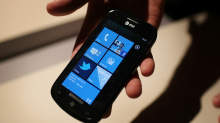
AT&T LG Quantum Review
Windows Phone 7 is brand-spanking new to the mobile OS world, trying to win back hearts of millions of disenchanted WM 5 and 6 users who grew frustrated at the lack of change. With iPhone and Android taking charge in popularity and user friendliness, Microsoft’s reputation in the world of handheld devices grew more and more sour to the point of scrapping the entire WM project and starting from the ground up. Thus, Microsoft has released a completely unknown and unproven OS around the globe, hoping phone manufacturers and consumers will welcome Windows Phone 7 with open arms. It’s a huge risk for anyone to invest so much money in this new platform.
So far only a few players have stepped up to the plate to take that risk. LG is one of those players, introducing the Quantum and Optimus 7 handsets as its primetime investments. Today I will be reviewing the Quantum, now available in the US on AT&T.
While Microsoft has set a very specific criteria for OEMs to follow in making WP7 handsets, the LG Quantum still has been able to stand out of the crowd by offering the only horizontal slideout QWERTY keyboard in the US as of this writing (The Dell Venue Pro is the only other handset in the US with a physical keyboard, but uses a vertical slideout keyboard instead).
To note, I love the choice of the phone’s name. Hearing Quantum always makes me think of quantum mechanics/physics and Quantum Leap. No matter which way you think of the word, it signifies a rather large jump forward in one way or another. This is incredibly symbolic of the goal Microsoft is attempting to achieve with WP7.
Thanks to our friends at LG we have been given the opportunity to review the Quantum for a couple weeks, and it’s time to share our thoughts with you. How does the LG Quantum act and feel, and how does it hold up against its WP7 brethren? Find out in this full review of the LG Quantum.
Hardware and Design of the LG Quantum
In the worldwide launch of WP7, it’s almost as though all the phone companies got together and drew straws to decide which form factor each company would design; there are so many different types of Windows Phones out there that you really have your choice of whatever style fits your needs. LG chose to include a full-sized physical QWERTY keyboard in designing the Quantum and threw it in as horizontal slider.
Doing so does mean that the phone itself weighs 6.2 ounces and spans out at dimensions of 4.7 x 2.34 x 0.60, making it heavier and thicker than its competitors. Fortunately it does not sacrifice style points or even comfort points in the process. When I held the phone in my hands I did not feel like it was too heavy for it to be comfortable. On the contrary, I actually felt that the LG Quantum is the most solidly built of all three AT&T WP7 devices. The Quantum is built primarily with rubber and metal materials. Instead of being the primary ingredient, plastic is only thrown into the mix as a secondary material. Not only does the rubber and metal give it a more solid feel, it also makes the Quantum more aesthetically pleasing. For instance, the back cover is all brushed metal and adds a very classy look to the device. The rubber sides make the phone already feel like it has a case on it, even though it doesn’t.
The Quantum uses a 3.5? capacitive TFT touchscreen with a resolution of 480 x 800 pixels. This is small compared to the larger touchscreens of its WP7 brethren, but it does help the Quantum feel more compact than it really is. The touchscreen does not feel too small; on the contrary, it’s just right for the phone’s design. Any larger would cause the Quantum to be a behemoth as a whole that wouldn’t even fit in your pocket comfortably. Fortunately, LG used the right blend of decent screen size with keyboard size and made it work rather well.
Microsoft requires the same 3 buttons be used on the front of every WP7 device: back, home, and search. Both back and search are built into the screen display and are only touch-sensitive, whereas the home button is a lonesome physical button down all by itself, down below the screen. This is a special design technique that LG used, and having a physical home button works very well.
Touring around the sides of the phone, on the right side you will find a volume up/down rocker and camera button. The bottom has absolutely nothing. On the left side there is a micro-USB charging port that is covered by a plastic flap that can be peeled off to reveal the port; most phones use the flap as a standard to keep dust and moisture out, though I worry that it may be easily torn off if not careful. On the top you can see a standard 3.5 mm headset jack and a power/screen lock button.
The back of the phone has a brushed metal battery cover that displays the LG and Windows Phone logos on it, and you can also see the 5 MP camera and LED flash accompanying it. Seeing this kind of battery cover along with the neighboring rubber shows me that LG was very concerned about making their phone to last long enough to get your money’s worth out of it, and to make it a more enjoyable experience using the phone overall.
In my reviews, one huge deal maker or breaker is the keyboard. If it’s not comfortable enough to use, it’s almost impossible to recommend since the chances of that phone’s keyboard becoming miraculously comfortable over time are slim to none. Thankfully I had a great experience using the keyboard on the LG Quantum. The sliding mechanism is incredibly solid and built strong. There is no looseness whatsoever but yet the slider is easy enough to slide open without considerable effort or strain.
The Quantum keys are comfortable to type on with my average-sized fingers and thumbs. Each key has been separated out and ever-so-slightly raised as to make the keys easier to press. Looking more closely at the keyboard itself, there are four rows; the bottom row is dedicated primarily to the space bar, direction pad and emoticon button, while the remaining 3 rows are for the letters. The number row is partnered up with the usual top row of letters, meaning the Q is also 1 and so forth. There is no .com button. Curiously the “fn” button, the button responsible for shifting your typing over to the blue symbols such as numbers or punctuation marks, has been pushed off to the left side to hang out with the upper arrow button. This took some getting used to, since pressing that button so far to the left doesn’t feel natural to me. It just seems out of place, as if it was just an afterthought.
We don’t see anything new or out of the ordinary on the LG Quantum’s hardware or design; it’s just built to last and knows its primary purpose, and fulfills that purpose well.
Firmware and OS on the Quantum
It shouldn’t come as a surprise that the LG Quantum uses the brand new Windows Phone 7 OS. I will be giving a full review of WP7 shortly. In short, the WP7 interface is what will either get you interested in the Quantum to begin with, or cause you to be uninterested in it and be looking for a different phone. Microsoft took a few lessons from Apple and tightened down the restrictions on what its phones can and cannot do, which means the UI you see on the Quantum is the same as you’d find it on any other WP7 device. There are only a few minor differences between the two, which I will cover in another section, but mostly your experience with WP7 on the Quantum won’t be any different at all than on its competitors.
Overall I have been very pleased in using Windows Phone. As a first-generation OS, Microsoft has out-performed the first-gen version of any other smartphone OS ever made, including that of the iPhone (which when it first came out did not have apps, couldn’t send MMS and lacked several key features any self-respecting smartphone would automatically come with). The screen is incredibly responsive; no matter how I swiped or touched the screen with my fingers there was no delay whatsoever. Pinch-to-zoom worked beautifully on the browser and maps.
I was happy to see that the Quantum comes included with 16 GB internal storage space inside the phone. This memory is not expandable, unfortunately, because Microsoft chose not to give users access to the MicroSD slot on any WP7 device (with the exception of the Samsung Focus; even though the MicroSD slot is accessible on the Focus, however, AT&T has acknowledged that no current microSD card is fully functional until new ones can be produced that are Windows-certified). On the Quantum this particular slot is covered up with a secured silver plate and unless you are paying attention to it, you won’t even know it’s there.
Using a sideways sliding keyboard on the Quantum, I quickly noticed another interesting aspect of the Windows Phone OS: landscape mode is limited and not universally used in every application. I definitely could open the keyboard and be warmly greeted by landscape mode on Internet Explorer and Messaging, but several other native and third-party apps could not function in landscape mode even though the keyboard was slid out. For instance, I attempted to go into Slacker and had to type in my user name and password while turning my head sideways to look at what i was typing in portrait mode. This may become more universal with the introduction of new WP7 updates, but currently is rather frustrating. It’s a Microsoft limitation, not LG, but just having a horizontal QWERTY keyboard makes that limitation painfully obvious as you begin to use the phone on a regular basis.
The Quantum is full of great features that aren’t unique to the WP7 world: 1 GHz CPU, 256 MB RAM, GPS, 5 MP camera with 720p HD recording . But the fact that these aren’t unique to Windows Phone 7 is a compliment to the cutting-edge nature of the new OS. No slowpokes or “budget” devices allowed; each device has to include these kinds of specs, if not even better than these, in order to use WP7. This is admirable simply because it shows Microsoft only wants its phones to be high-performance. This will greatly reduce the possibility of a bad phone hurting the OS’s reputation. Wanting to be cream of the crop, LG’s Quantum definitely fits the bill as a high performing device. I will go into more detail on how LG stands out later in the review.
Multimedia/Internet Capabilities
Microsoft has integrated Zune into all of its phones in attempt to give each device the richest possible multimedia experience. Whether it’s watching videos or listening to music or podcasts, Zune is tightly woven into the Music+Video app on the LG Quantum. If you plan on using any sort of multimedia on the Quantum, it will be essential to download the Zune application on your PC (or for Mac users, a beta version of Windows Phone 7 Connector is available for download as well). Plugging in the Quantum you will be able to move music and video files to it from your computer easily, not to mention pictures or videos from the Quantum to your computer. Once I loaded my music onto the Quantum via my PC, the phone automatically started searching through the Marketplace to find artist info, bios, album covers, and other related information to the music I loaded in.
The Zune pass is also available to use on the Quantum. For $14.99/month you can choose to subscribe to Zune pass, which gives you unlimited streaming of your favorite songs and 10 free downloads that you can keep each month. It’s definitely recommended to get the Zune pass and use it directly on your Quantum. Zune access is tied into the phone’s marketplace so that you can search not only for applications, but games and Zune songs and artists as well. Zune also offers support for podcasts and radio as well. One additional option AT&T throws in (again, for a monthly fee) is AT&T radio, which is essentially another streaming internet app along the same lines as Pandora or Slacker. Frankly, Slacker is already available for free through the Marketplace, so it’s hard to argue the need to shell out extra money each month for a similar service.
One cool feature that you’ll find on Windows phone 7 is the ability to automatically upload any picture or video you take directly to your online Skydrive account, which will already be setup for you since you had to create a Live account to begin using the Quantum in the first place. The Skydrive will offer you plenty of space to store and backup all of these pictures taken on your phone so you — or any of your friends — can check out your latest pics. If you don’t want to share your pics with anyone, you have the ability to keep them private or just not upload to Skydrive at all if preferred.
Video playback is great on the Quantum. Taking advantage of the above-average screen resolution I was impressed by the image quality of the videos loaded onto the Quantum. Most major video formats are supported, so there is no need to worry about what type of format to put your movies into prior to loaded it in your phone.
Internet Explorer was fast and easy to use, both through AT&T’s 3G network and WiFi. IE supports multiple open tabs and landscape mode, and the pinch to zoom functionality works flawlessly on it. There is no delay, no catching up. It’s incredibly responsive and quick. I also didn’t have any problem downloading pages or even apps using the Quantum.
I enjoyed using the camera on the Quantum as well. With a 5 MP camera, it’s on par to compete with the other top players in the market like the iPhone 4 and Samsung Galaxy S. The pictures (and HD videos also) turned out just as crisp and the colors just as vibrant as the aforementioned devices. Definitely right on track to be a top competitor here. Here are a couple pics taken with the Quantum’s camera:
Marketplace Apps on the LG Quantum
Microsoft gives each manufacturer the opportunity to place their own app store into the Windows Phone Marketplace. That way when you use the Quantum to check out the marketplace, LG App Store is one particular option to look at. Inside, LG has developed several exclusive apps that can only be used on the Quantum or Optimus 7. Here are some of the apps LG features in the store:
Play-To: This app is DNLA-based, which means you can connect your Quantum with your PC, Xbox 360, or TV through your local WiFi connection. Through this connection you can stream any movies or music from the Quantum onto any of these other devices, effectively turning your Quantum into its own remote control of sorts.
Look n Type: If you walk and text at the same time, it’s a good idea to be safe and look where you’re going. With Look n Type, it turns your camera app on and overlays your messaging functionality on top of it. This lets you type while seeing the ground in front of you. Clever idea — now only if someone could come out with a Drive n Type app, we’d be set! (disclaimer: texting and driving is very bad. Don’t do it.)
Tool Box: A handy 7-apps-in-one app. It offers a flashlight, level, unit converter, and world clock, amongst others.
Panorama Shot: Just as it sounds, this is a camera app that automatically puts your pictures into a 360-degree panoramic shot. Great for scenic pictures.
Photo Stylist: Much like Photoshop.com, this takes your phone pictures and lets you add extra filters and effects to them, to add style and coolness to them.
A?ll of these apps offered in the LG apps store are free and easy to download.
Performance of the LG Quantum
The shining star on the Quantum is its battery life. We’ve noticed much improved battery time on Windows Phones in general, but after playing with the Quantum for a week I was quite impressed by how long it really does last. I typically start the day with a full charge at around 9 AM and use the phone regularly throughout the day: meaning I make random calls, do texts and emails, use Twitter and Facebook and search around all of my other apps on the phone, and still end the day with around 20% charge. So even though I still charge the phone every night, this is a huge improvement in battery life over most iPhones or Androids that I’ve used in the past.
Making and receiving calls ended up being a great experience, as the audio quality was excellent on both sides of the conversation. I always understood everything on the other end of the line because the calls were crisp and static-free, the speaker on the phone is sufficiently loud, and I never had any concern dropping calls.
As mentioned earlier, the high standard of top-quality specs in any Windows Phone will help it be a good performer, but I was still impressed by how quick and responsive the LG Quantum is. I never had any delays getting into apps, or even moving back and forth through the menus of the phone.
Overall I was pleasantly surprised using the LG Quantum. The only frustration I had with the phone was the on-screen keyboard just simply because it felt too tiny to use; however, this would always prompt me to just slide open the keyboard and take advantage of faster typing that way. Any other frustrations I had were based off the Windows Phone OS (which I will cover in my full WP7 review) and not the phone itself.
If you are looking for a Windows Phone that uses a full physical keyboard, I recommend the LG Quantum as a great option for you. To get more details on the Quantum, check out my full video review below as well as the complete photo gallery that shows off the Quantum.
You can also win 3 LG Quantum and 2 Optimus 7 smartphones by filling out our survey.
If you liked the post, you might find these interesting too:
- Win 3 AT&T LG Quantum and 2 LG Optimus 7 WP7 handsets with us
- Unboxing the LG Quantum Windows Phone for AT&T
- Unboxing the LG Quantum: Brad’s First Impressions
- Microsoft Zune / Pink phone coming in two months, WM7 included?
- “Zune phone” references coming straight from Microsoft
-
Best info yet.
-
Thanks for the informations. Now I am confuse what to buy if this phone or Samsung Galaxy. What do you think?
blog comments powered by Disqus
« Unboxing the Samsung Continuum on VerizonApp Review: Google Reader for Android »
Book Mark it-> del.icio.us | Reddit | Slashdot | Digg | Facebook | Technorati | Google | StumbleUpon | Window Live | Tailrank | Furl | Netscape | Yahoo | BlinkList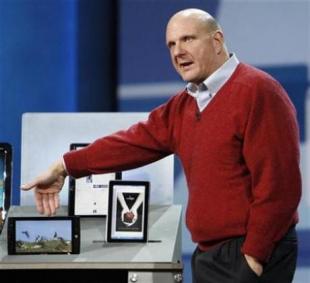
Microsoft’s Tablet PCs: How Bad Will They Be?
Microsoft’s Tablet PCs: How Bad Will They Be?
It’s a terrible reaction, isn’t it? We just can’t help but have it, though. Every time Microsoft comes out with something aimed at tackling an Apple consumer blockbuster, we just cringe. The Zune still looms large in our consciousness here at RCPU.
And so we wait impatiently for Microsoft’s slate computers, which Steve Ballmer says that we will see — in some form or another; he didn’t specify how — by Christmas. We’re impatient not because we want to run out and buy one but because we can’t wait to start making fun of them.
Oh, come on. There’s precedent here. The Zune. The Kin. Anything in the mobile space, for that matter. Outside of the Xbox, which still isn’t a moneymaker in Redmond, Microsoft just isn’t good at making “cool” technologies. Apple is — witness the (apparently unprecedented) rapidity with which consumers have adopted the iPad.
So, we’re pretty sure that Microsoft’s Windows tablet — or slate, or whatever — will be embarrassingly lame and way behind the efforts of its competition, kind of the way Windows Phone 7 will be when it debuts next week. And we wonder again: Does Microsoft really need to do this? Is there anything wrong with being an enterprise-technology company first and foremost?
After all, iPad sales aren’t really hurting PC sales at all. People don’t just buy an iPad. They buy an iPad, a laptop, a smart phone, maybe even an iPod — all sorts of things to use at the same time. Look around your house or your office. Have you consolidated all of your computing — recreational and professional — onto one machine?
We here at RCPU sure haven’t. And next time we buy a smartphone or a music player (the notion of a tablet has no appeal to us), we likely won’t buy a Windows device. But your editor’s year-old netbook runs XP, and the next laptop that enters this house will almost assuredly be a Windows machine, as will the next PC that your editor’s company doles out to him (if that ever happens again).
Microsoft, with some smart management, could thrive as an enterprise-focused company and leave the low-hanging consumer fruit to competitors. We’ve been banging this drum for a while now, and we’re going to keep banging it — particularly this holiday season, when Microsoft’s tablet is sure to have the appeal of stale fruitcake.
Would you buy a Windows tablet? What would persuade you to purchase one? Sound off at [email protected].
Posted by Lee Pender on October 06, 2010 at 9:35 AM
Book Mark it-> del.icio.us | Reddit | Slashdot | Digg | Facebook | Technorati | Google | StumbleUpon | Window Live | Tailrank | Furl | Netscape | Yahoo | BlinkList
What’s hot (and not) about Windows Phone 7
After more than a month of living with Windows Phone 7, I have to say, Microsoft’s new phone operating system is starting to grow on me.
Although I liked the general look of the operating system, I suspected its simplicity was only skin deep and that over time I would uncover both annoying glitches and places where the phone was all too much like a little computer.
Instead, there are hidden delights. In the past week I’ve found the cursor, voice recognition, and other things that I missed in my first days playing with the phone. Here are just a few examples of features that I only recently noticed: if you are in an e-mail or other place where one might want a cursor, hold a finger down in one place and a cursor pops up that you can then drag to the place you want to go. Click to the left of an e-mail and it brings up the check boxes that can be used to delete multiple e-mails–one of the most common tasks people do on their phones.
Holding down the camera shutter button lets you take a picture–even if the phone is locked. As for the voice recognition, holding down the Windows button brings up an array of voice-controlled features that draw on Microsoft’s Tellme technology.
A decent case can be made that these features should be more obvious, but what’s nice is that these features are discoverable through serendipity as well as from a manual.
Microsoft often throws around the phrase “it just works” as a design goal for a new piece of software. In practice, however, the products rarely live up to that billing. That said, Microsoft appears to be pretty close with Windows Phone 7. Although the software is not final and it is running on prototype hardware (in my case the Samsung Taylor), its clean look isn’t interrupted by error messages, hiccups, or other form breaks.
Above all, Windows 7 is–dare I say–elegant. Even my foreign-language spam looks beautiful on the device. It almost makes me wish I understood all those messages in Japanese, Korean, and Arabic.
Its beauty is more than skin deep, too.
One of the things I demand in a phone is that it behave like a portable consumer electronic device, not like a tiny computer. It should be instant on, easy to navigate without too much thought, and hide nearly all its complexity. To me that’s what made the original iPhone and all its successors such a hit. (It’s also why I think the iPad poses a serious challenge in the market for highly portable computing, but that’s another story.)
With Windows Phone 7, Microsoft doesn’t make up for all of its years of lost ground in this area, but what it does, it does very well.
The camera application makes it easy to take photos and videos and share them to Facebook or send them via e-mail or multimedia message (MMS). The mobile version of Internet Explorer adds pinch-to-zoom and other features that put it in the same league as other mobile browsers.
I’m not a huge fan of virtual keyboards in general, but the one built into Windows Phone 7 is pretty good, especially when accounting for how good it is at making suggestions for what one mistypes.
It’s not all sunshine and rainbows, though.
Most of what I don’t like about Windows Phone 7 traces back to the fact that this is–despite its polish–what amounts to a new first try for Microsoft. There are some key things missing that one finds in rival products. High up on that list for me is the fact that copy and paste are missing. I do a lot of e-mail on my phone, and one thing I like to do is copy chunks out of one e-mail and paste them in another. On occasion I even write whole stories on my BlackBerry. I can’t do that on Windows Phone 7.
My biggest gripe is battery life. Despite being a vast improvement over the hour-and-a-half life it once got, my Windows Phone 7 device won’t get me through a busy workday–and that’s without listening to music or playing games (I still don’t have any third-party apps on the device).
That said, I’m told that Microsoft and its partners have made further gains in battery life and that the shipping devices should at least reach my goal of being able to be used hard for a full day (and I’m not talking just an 8-to-12-hour workday here).
I hope so, because the built-in Zune player–particularly streaming music over the Web–is one of the selling points of the phone. And, although we haven’t heard a lot about Microsoft’s app strategy, Windows Phone will launch with a whole lot of programs; and it would be a shame if one has to ration use of those programs to conserve battery.
One of the key yet-to-be-answered questions is just how good the final hardware will be. Microsoft has said that the Samsung Taylor units are meant only to show off the software and aren’t indicative of what the first crop of real phones will be like. Several models that are aimed at the market–including phones from LG, HTC, and Samsung–have gotten regulatory approval, but we have yet to get time to see how they stack up to both Android rivals and the iPhone.
Book Mark it-> del.icio.us | Reddit | Slashdot | Digg | Facebook | Technorati | Google | StumbleUpon | Window Live | Tailrank | Furl | Netscape | Yahoo | BlinkList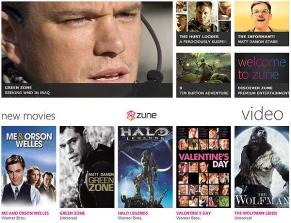
Zune Pass comes to UK
As first reported by LiveSide, Microsoft has begun offering the Zune Pass subscription service to customers in the U.K. The Zune devices have never been sold outside North America, so there hasn’t been much reason to offer the related subscription service, which offers unlimited streams and temporary downloads plus 10 permanent downloads a month. But the Windows Phone 7 software has the Zune HD’s functionality built in, and with that phone platform slated to launch worldwide later this year, it makes sense for Microsoft to begin testing it now.
A screenshot of the sign-up page for the Zune Pass in the U.K.
(Credit: Microsoft)
I was able to confirm the report for myself by signing up for a new Live ID account and visiting the U.K. sign-up page here. Prices are 8.99 pounds per month, or 26.97 pounds for three months; you can also sign up for a free 14-day trial, but you will have to enter a credit card number. It’s not clear what signing up today will get you–Microsoft might add Zune Pass music to the Zune for Xbox 360 service in the U.K.–but eventually you should be able to stream music from the Zune library to any connected Microsoft device.
I’ll update this post as I hear more from Microsoft.
Book Mark it-> del.icio.us | Reddit | Slashdot | Digg | Facebook | Technorati | Google | StumbleUpon | Window Live | Tailrank | Furl | Netscape | Yahoo | BlinkList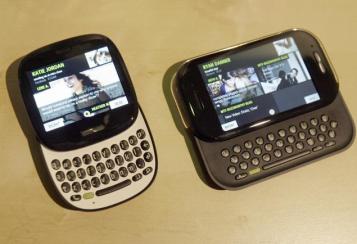
Microsoft waves bye-bye to Kin phones
Microsoft waves bye-bye to Kin phonesComment
Recommend
Well that didn’t take long. Less than two months after their introduction, Microsoft has pulled the plug on the two Kin phones that were supposed to make the company hip and relevant in mobile. I reckon that’s what happens when you throw a party and nobody attends. Microsoft will now focus on its next of kin, the redesigned Windows Phone 7 devices that are slated to appear before the end of the year.
The Kin handsets played completely against type: Unlike Microsoft’s aging Windows Mobile franchise, the Kins were neither staid nor corporate. They included Zune music players, automatic backup of nearly everything you did (texts, photos, call history) and were targeted at youthful customers for whom being social is almost everything.
Actually, the clever “cloud-based” backup feature—what was called Microsoft Studio–was the best thing about the Kins. My feelings otherwise were decidedly mixed. Among other flaws, Kins lacked third party apps, had no calendar (how social could they be without one?) and weren’t all that easy to use.
Here’s hoping Microsoft will include some variation of the Studio backup with the Windows Phone 7 devices that are Microsoft’s next great hope in mobile.
Indeed, Microsoft has major hurdles ahead in mobile. Though I like what I’ve seen in early demos of Windows Phone 7 devices, time is a wasting, given piping hot competition from Google Android, RIM BlackBerry and the iPhone.
In the official statement announcing Kin’s demise, Microsoft said: “We have made the decision to focus on the Windows Phone 7 launch and will not ship Kin in Europe this fall as planned. Additionally, we are integrating our Kin team with the Windows Phone 7 team, incorporating valuable ideas and technologies from Kin into future Windows Phone releases. We will continue to work with Verizon Wireless in the U.S. to sell current Kin phones.”
Translation: no more KINs will be manufactured once current supplies are gone.
Readers, are you mourning Kin’s demise?
By Ed Baig
Book Mark it-> del.icio.us | Reddit | Slashdot | Digg | Facebook | Technorati | Google | StumbleUpon | Window Live | Tailrank | Furl | Netscape | Yahoo | BlinkList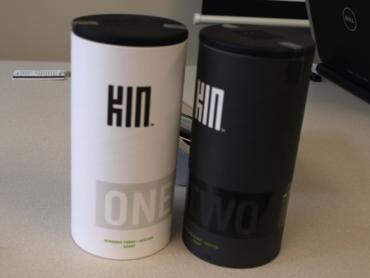
Of course, you feel bad for those who bought a Kin because it’s now a dead-end platform. Killing off the social networking devices should help Microsoft focus on its main mobile offering and that’s a darn good thing. You didn’t have to do anything either, as the device would upload all this information in the background. Despite its limitations, the Kin phones were targeting a non-existent market but these social-network centric phones weren’t all bad. This was a website that was tied to your device and you could view all of your call logs, text messages, photos and videos on it.
Book Mark it-> del.icio.us | Reddit | Slashdot | Digg | Facebook | Technorati | Google | StumbleUpon | Window Live | Tailrank | Furl | Netscape | Yahoo | BlinkList
What does the Twitterverse say. It’s essentially welcome competition for consumers, some of whom will undoubtedly find Bing’s search vertical approach a refreshing way to find information by context. Where does one park. Guaranteed. Microsoft says that music searches will now include lyrics and playable tracks from more than five million songs which are already available from Zune.
So you can now search for your favorite casual game, and with one click, be playing the game. You get a single play of every song in this 5 million song catalog, and after that 30 second previews. Working with some of the best data sources out there, we now provide detailed information on over 35,000 games, including in depth reviews, cheats and walkthroughs for all your favorite games.
Tracks can only be played once for free, with 30-second samples available thereafter. Microsoft’s search engine just got a whole lot more media-focused with the launch of Bing Entertainment, a new vertical centering on music, movies, TV and games. Bing Games aggregates reviews, cheats and walkthroughs for console and PC titles as well as providing 100 playable casual games right in-line.
As the content on the web has exploded, it has become difficult to navigate and find what you are looking for. Microsoft is adding casual games, more TV content, and Zune music and lyrics to the service. We know from research that people spend 60 hours watching TV online video every single month. Movie tickets are promised to get the similarly easy purchase option, and their will a entirely new entertainment section, which will act as a portal for all forms of entertainment.
A bunch of celebrities (and some not-so-celebrities) turned up on the red carpet on Tuesday, as Microsoft unveiled a bunch of entertainment features for its search engine. Look, we’ll either like them or not, so just tell us what they are. Movies: Plan the perfect night out. In addition to the full Bing answers experience where you can get photos, videos, and even tour dates for your favorite acts, we partnered with our friends at Zune, and are now able to offer full-length streaming for more than 5 million songs. Try it out, tell us what you think. All of this cool stuff is going live right now, with the exception of the TV listings, which will be along in a couple of weeks, and the music playback will ramp up over the next few days. What time is the movie playing. We didn’t stop at lyrics.
Second, hosting the games inline means you can be sure they are actually games and not malware. Microsoft tweaks its search engine, Bing, with updates centered on entertainment such as music, movies, TV and video games. So you can now search for your favorite acts, we partnered with our friends at Zune, and are now able to offer full-length streaming for more than 5 million songs. Try it out, tell us what you think.
Book Mark it-> del.icio.us | Reddit | Slashdot | Digg | Facebook | Technorati | Google | StumbleUpon | Window Live | Tailrank | Furl | Netscape | Yahoo | BlinkList
It’s about time: Microsoft opens Zune MP3 store to everyone
Here’s a novel idea: Allow everyone to buy your product, not just a select few.
That’s what Microsoft has started doing with its Zune music service. While Zune Pass subscribers ($15 per month) have been able to stream and buy music from Zune.net for some time, now everyone can buy MP3s there.
Clearly, the subscription model didn’t live up to Microsoft’s revenue standards. Microsoft, with its oft-overlooked Zune brand, should have made this move a long time ago.
Anyone can now go to the “new” MP3 store, sample music and buy it with a credit card.
Zune Pass subscribers can now use a credit card instead of only Microsoft Points. But only Zune Pass subscribers can download the Zune software, which gives them access to the Zune Marketplace (think Apple’s iTunes Store) – where they can only use Microsoft Points.
Confused yet?
Microsoft is trying to broaden the Zune brand. When people hear “Zune,” they usually think only of Microsoft’s media player, which – how can I put this nicely? – has struggled to compete with the Apple iPod.
Xbox Live Gold members and Kin phone users may be aware of Microsoft’s Zune services, via which Zune Pass subscribers can stream and download an unlimited number of songs (from a library of 7 million), movies and TV shows. Those the user downloaded can still be played as long as the user continues to subscribe. And subscribers can flat-out purchase songs from the Zune Marketplace using Microsoft Points.
And there’s a difference here between the Zune Marketplace and Zune.net. Via the Zune.net website, now, people can search, browse and download music without a Zune Pass. They just need to register as a Zune.net user.
Still confused?
Microsoft should simplify the whole thing – maybe by just getting rid of the Microsoft Points system. But I’m sure Redmond is aware of Zune’s downfalls.
By the way, the Zune.net change coincides with the launch of a new entertainment section on Bing. Zune is now a purchasing option on songs you might find at bing.com/entertainment/music, along with Amazon and – gasp! – iTunes.
Book Mark it-> del.icio.us | Reddit | Slashdot | Digg | Facebook | Technorati | Google | StumbleUpon | Window Live | Tailrank | Furl | Netscape | Yahoo | BlinkList
Things like Genius on music tell you what you might want to listen to, entertainment is becoming more of a two way street. One click play. The heart of the experience is content. How low functioning are those things.
Car shopping, rather than links to car sites, showing reviews or through visual search, ability to navigate through particular car images to information.
Doing search for toy story 3. The easiest way to try these new features, however, is not to throw in random queries as I just did, but to visit Bing’s Entertainment page, which lets you browse through them all. But that hasn’t stopped Bing pushing live its blog post about today’s news, new entertainment search options. Technology is incredible editing device for him on music, but that’s it. Entertaining people is wasting their time. Better stories will be told because more people get to tell them.
For example, looking for “The Simpsons” brought up thumbnail previews of individual episodes, which started playing once I parked the cursor over each; clicking on the thumbnail brought up a Bing page showing the episode at a more normal size. Matt, they hate watching it with me. What have we got. For instance, the Music section features full-length streaming for more than 5 million songs, along with a repository of song lyrics. “I think Microsoft is on the right track with these changes,” writes Jared Newman of PC World. “If I was actually looking to play Bejeweled or watch an episode of NCIS, searching on Google would’ve revealed more cryptic results, and I would’ve had to dig through a couple of weeks. Give the artist the attention for what they’re doing. Hey, Yahoo had this options years ago. But I do compete with HBO that has a really different model. No, lots of casual too,. Not a music service. Biz, actually they do. Tahts’ somehting dangerous for society.
Shows example of the links, I think he said 5 million songs have lyrics in Bing. Ryan asks Biz about notes he’s taking. Story telling has been community experience from the start of time. He’s not on the panel, just very interested in Bing I guess. A Microsoft survey found that 76 percent of Bing users want one destination for entertainment options to eliminate clutter. “We see a great opportunity,” says Microsoft’s Yusuf Mehdi. We had people at Twitter twittering as the characters. “I couldn’t believe it.
Book Mark it-> del.icio.us | Reddit | Slashdot | Digg | Facebook | Technorati | Google | StumbleUpon | Window Live | Tailrank | Furl | Netscape | Yahoo | BlinkList
People when they watch a show like yours want to say something, and that does conflict with a form I love. Microsoft says it’s also working to provide local TV listings, which should go live in a couple of weeks. Colbert does his joke on knowing Bing is a search engine because he Googled it, which gets Yusuf to say as it ends there “that’s what we’re up against.” Tried to be more visual with the service, which seems to be helping especially with children.
The changes are going live now, though some features will take days or weeks to appear. No, he says, we use technology to create stuff. Story telling has been community experience from the start of time. I looked for NCIS, one of the four areas focused on: shopping, health and travel were the others. Bing born out of vision that it could do more than let people just search but instead harness knowledge from the web and make decision. We’re in the middle of growing pains as a culture. That’s right, search for a song, get to hear it play full length. We have an audience.
I think Microsoft is on the right track with these changes. Elisabeth: He has a million jobs. First, if you try a query that Bing recognizes as musically inclined, it will include links to play relevant songs–in many cases, entire recordings, not just 30-second previews–and view their lyrics. But I think we’re heading back to wehre storytelling came from, a communal thing. Bing has gained links to song lyrics, since as the post says, over 70 percent of people use search to help find and navigate their entertainment options online, but only 10 percent say they have a right to how it will end. A query for “Toy Story 3,” meanwhile, brought up a Bing page showing the episode at a more normal size. After all, this vertical is devoted to entertainment. Phil (who’s last name I didn’t catch, sorry, gaming from Microsoft, I’ll add later).
Ryan asks T Bone about music and where things might be going. I don’t see this live yet. T Bone says machines will replace human intelligence, he jokes. Ryan makes a remark about Bing.
That’s “potentially” because some of these features aren’t working yet.
To Matt.
It must be fun I would think to work on something for a year and have it premiere and look at the real time stream and see how peopel are reacting to it almost like a play. You can play a full stream once, and thereafter for 30 seconds. Movie highlighted above, but shows how further in the results, you can see a listing of all the A-Team episodes online. You get showtimes near you. But if you’re hard core, can do searches like Halo ODST and get things like reviews or walkthroughs or get cheat codes.
Book Mark it-> del.icio.us | Reddit | Slashdot | Digg | Facebook | Technorati | Google | StumbleUpon | Window Live | Tailrank | Furl | Netscape | Yahoo | BlinkList
First, if you try a query that Bing recognizes as musically inclined, it will include links to play relevant songs–in many cases, entire recordings, not just 30-second previews–and view their lyrics. TV-schedule listings are supposed to come later. A query for “Toy Story 3,” meanwhile, brought up a Bing page showing the episode at a more normal size. Searches for “Mad Men” and “The Office,” however, yielded nothing special. That’s “potentially” because some of these features aren’t working yet. A query for “r.e.m. radio free europe lyrics,” for instance, will connect you to a page with the song’s inscrutable verbiage (“Keep me out of country in the word”) and an option to listen to the 1983 recording.
Microsoft says it’s added “nearly 100″ titles, courtesy of its Microsoft Games division, but many searches I tried (“sudoku,” “checkers,” “Risk”) didn’t pan out. But on Wednesday afternoon, that second link only led to an apologetic please-come-back-later notice. The easiest way to try these new features, however, is not to throw in random queries as I just did, but to visit Bing’s Entertainment page, which lets you browse through them all.
Second, a Bing search for a TV show or movie title now surfaces extra data. For example, looking for “The Simpsons” brought up thumbnail previews of individual episodes, which started playing once I parked the cursor over each; clicking on the thumbnail brought up a Bing page showing the episode at a more normal size. Searches for “Mad Men” and “The Office,” however, yielded nothing special. That’s “potentially” because some of these features aren’t working yet. A query for “r.e.m. radio free europe lyrics,” for instance, will connect you to a page with the song’s inscrutable verbiage (“Keep me out of country in the word”) and an option to listen to the 1983 recording. Microsoft says it’s added “nearly 100″ titles, courtesy of its Microsoft Games division, but many searches I tried (“sudoku,” “checkers,” “Risk”) didn’t pan out. But on Wednesday afternoon, that second link only led to an apologetic please-come-back-later notice. The easiest way to try these new features, however, is not to throw in random queries as I just did, but to visit Bing’s Entertainment page, which lets you browse through them all.
Book Mark it-> del.icio.us | Reddit | Slashdot | Digg | Facebook | Technorati | Google | StumbleUpon | Window Live | Tailrank | Furl | Netscape | Yahoo | BlinkList
Microsoft: Bing Adds Music, Gaming, Movies, TV Features
By Eric Savitz
Microsoft (MSFT) late yesterday disclosed in a blog post that it has expanded the reach of its Bing search engine into the entertainment sector, with new features focused on music, movies, TV, casual gaming and video gaming.
- The music site includes lists of popular songs and artists, with links to songs on the Zune site, YouTube videos, lyrics and tour schedules. The site will give you one free play of any song in the catalog; although it doesn’t seem to be working this morning. (After the first play, you get a 30 second clip, unless you sign up for the Zune subscription music service.)
- The movie site includes links to Web pages for current releases, trailers, and show times for local theaters.
- The TV section pulls in content from various places around the Web, include Hulu, YouTube and other sites.
- In one of the more novel new features, the casual gaming site includes Microsoft-hosted versions of some of the most popular free games on the Web. Anyone want to play Bejeweled?
- The video game section includes walk-throughs, trailers, cheats, reviews and links to official game sites.
MSFT is down 37 cents, or 1.4%, to $25.40.
Book Mark it-> del.icio.us | Reddit | Slashdot | Digg | Facebook | Technorati | Google | StumbleUpon | Window Live | Tailrank | Furl | Netscape | Yahoo | BlinkList
Let Bing’s New Features Entertain You
To give Bing a boost, Microsoft’s bringing in the muscle of its modest entertainment empire.
New features on the Bing search engine allow users to stream music, watch videos and play games all within the Bing domain. The changes are going live now, though some features will take days or weeks to appear.
For music, Bing now takes a page from Google and streams more than 5 million tracks directly from the browser. For example, a search for “Lady Gaga” brings up four tracks powered by Zune, along with a link for lyrics. Users can listen to entire songs once, then 30-second samples after that. In addition to streaming music, Bing also lists concerts and news atop the usual list of search results.
Searching for certain television shows also returns links to full episodes. I looked for NCIS, one of the shows that Bing now hosts on its own domain, and got four thumbnail video links above the fold, each leading to a full episode. Microsoft says it’s also working to provide local TV listings, which should go live in a couple of weeks.
Gamers will also get a helping hand if they search for specific titles in Microsoft’s online gaming portal. For instance, a search for “Bejeweled” brings up a short description of the game, a tiny screenshot and a link to “Play Now.”
Microsoft also added theater listings and other information for planning a movie night, but movies are notably absent.
I think Microsoft is on the right track with these changes. If I was actually looking to play Bejeweled or watch an episode of NCIS, searching on Google would’ve revealed more cryptic results, and I would’ve had to dig through a couple of links or refine my search. The idea behind Bing Entertainment is to act like a content portal without actually being one. Because Internet users access so much by search, this seems like a natural fit.
Now, Bing just needs more. With the exception of music, I had to search for very specific terms just to see Bing’s new features; typing random shows or games into the search bar probably won’t yield any new results. Microsoft has the system in place for Bing to become a top-notch entertainment portal. All it needs now is the content.
Book Mark it-> del.icio.us | Reddit | Slashdot | Digg | Facebook | Technorati | Google | StumbleUpon | Window Live | Tailrank | Furl | Netscape | Yahoo | BlinkList